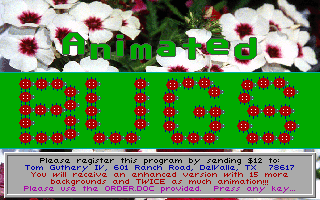
Animated Bugs turns a basic board game race into an early Windows-era digital play set, pitting two brightly colored insects against each other across customized paths.
Solving early digital board games with Animated Bugs
Back in 1994, software developers making educational games for younger kids faced a recurring hurdle: standard board games were hard to mirror on a computer screen without boring early readers. Many studios tried heavy text prompts or complex puzzle screens, but developer Paul Mace and Flix Productions took a far simpler path with Animated Bugs. They stripped away dense reading requirements and built a pure linear board race centered on visual rewards and immediate feedback.
When you start a session, you choose who controls the two main pieces: Red Bug and Blue Bug. You can set up a classic two-player match between human players taking turns at the keyboard, pit a child against a computer opponent, or simply let the computer control both sides. Watching the PC battle against itself turns the software into an automated digital show, which was a clever way to keep pre-readers entertained before they learned the interface controls.
The core setup is direct and accessible. There are no stats to track, no inventory slots to fill, and no complex rulesets to memorize. The objective is simply to move your chosen insect along a track until one reaches the end of the path. That simplicity makes this 1994 release easy to pick up within seconds, even if you have never seen it before.
Twenty backgrounds, six difficulties, and three distinct wheels
Where the game surprises you is in its setup screen options. Before starting a race, players are given a surprising amount of visual customisation. You can choose from 20 different background scenes to serve as the game board, changing the entire visual mood of the match with a few clicks.
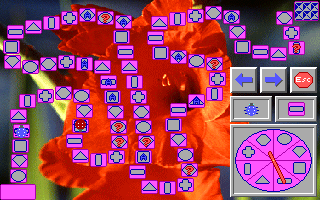
Beyond the artwork, you can pick between three distinct spinner wheel designs to determine movement. The difficulty setting is controlled through six distinct tiers. Instead of making computer opponents smarter or faster, adjusting the difficulty alters the grid itself by increasing or decreasing the density of special fields scattered along the trail.
This approach allows parents or older players to tailor a session's chaos level. If you set the density high, almost every step triggers a field event or forces another spin. Lower settings create a smooth, predictable race straight to the finish line.
Spinning the dial and stepping square by square
On any turn during an Animated Bugs MS-DOS game session, your main action is clicking to spin the central wheel. The dial produces a movement value ranging from 1 to 8. Once the wheel stops, your red or blue insect marches forward or backward along the track, stepping button by button toward its target destination.
The board contains two main types of special tiles that break up standard movement:
- "A" Animation Fields: Landing on a square marked with an "A" triggers a short graphical cartoon featuring the bugs, serving as a reward for reaching that spot on the board.
- "?" Question Mark Fields: Landing on a question mark field forces you to spin the movement wheel a second time, applying a surprise shift that bounces your piece forward or backward across the grid.
That random movement loop is where the main friction lies. Landing on a string of question mark tiles can repeatedly bump you backward, prolonging a simple race far longer than intended. Because progress relies entirely on wheel spins and tile placements, strategy is non-existent. You are entirely at the mercy of the digital dial, which makes a full match feel lively for younger children but mechanical for anyone older.
Audio comes down to basic PC speaker clicks paired with optional support for the Disney Sound Source peripheral. The tick of the spinner wheel and the simple beeps for character movement fit right alongside mid-nineties PC hardware setups, even if the sound effects themselves are as basic as they come.
Why you can play Animated Bugs online right now
As a game design experiment, this title holds up as an authentic slice of mid-nineties edutainment software. It does not pretend to offer deep mechanics or branching tactical play. Instead, it delivers a colorful, predictable race built around direct visual feedback, custom backgrounds, and animated rewards for young kids learning basic counting and turn-taking.
The lack of strategy and total reliance on random wheel spins mean it will not hold an adult's attention for long, though the crisp layout and customizable options still give it a clean look. It is a neat piece of Paul Mace's early DOS software catalog.
You can play Animated Bugs online free in your browser right here. There is nothing to install and no setup required, so you can pick your insect, choose a background, and test out the spinner wheel in seconds.