
In Castles II: Siege & Conquest, claiming the crown of 14th-century France is less about heroic swordplay and more about balancing timber harvests, building curtain walls, and keeping the Pope satisfied.
Most grand strategy games from the early nineties made conquest a matter of simply marching larger sprite armies into enemy hexes. Quicksilver Software took a different route by anchoring your royal ambitions to a concrete score metric and a fragile web of logistics. Playing as one of five ambitious dukes in 1312 Bretagne following the death of King Charles, you are not simply trying to wipe out your neighbors, but reaching 7,000 victory points to petition the Pope for the right to rule.
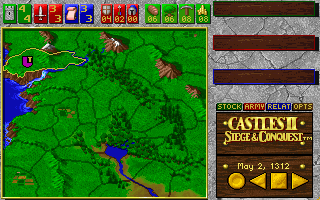
The campaign unfolds across a territory map split into multiple land provinces where four main resources govern everything you do: Gold, Timber, Iron, and Food. If you neglect your gatherers, your kingdom grinds to a sudden halt. Iron is particularly vital because arming soldiers demands it, and launching an invasion requires at least one unit of Iron in reserve. Thousands of players in 1992 got thoroughly stuck wondering why their armies refused to march, simply because they missed that single sentence in the printed documentation.
Early in your campaign, Interplay Productions made sure you kept that physical manual nearby through strict copy protection prompts asking for specific historical details. Once past the check, you navigate real-time task allocation menus while keeping an eye on the calendar. Once you finally amass 7,000 points and ask for Papal backing, the rest of the map turns on you instantly, forcing you to hold your borders against aggressive rival dukes for up to five grueling months before victory is sealed.
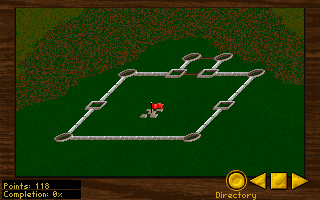
Building strongholds is where the title earns its name, presented in a crisp diagonal-down perspective. Designing a castle requires laying out individual wall segments, guard towers, and main gates to maximize defensive strength without exhausting your timber and stone reserves. The editor lets you craft custom layouts from scratch or save pre-built castle blueprints to disk, letting you drop fully planned fortresses onto newly claimed territories in seconds.
Constructing these structures does more than give you defensive options in battle; it is a vital administrative tool. Provinces that lack a direct territorial connection to a castle province are prone to fierce peasant revolts. Losing key provinces to local uprisings because you failed to chain your castle holdings together is a harsh lesson every player learns early on.
When diplomatic negotiations stall and sabotage fails, conflict shifts to a separate tactical battlefield screen. Armies consist of four primary troop types:
Combat operations run in real time, requiring you to position units prior to engagement. However, actual tactical control during battle is surprisingly rigid. Once units collide on the battlefield, direct fine-grained command gives way to automated skirmishing, meaning success depends heavily on initial troop ratios and pre-battle positioning rather than swift battlefield maneuvering.
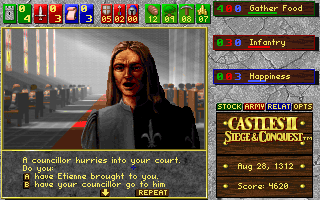
Outside of combat, text prompts trigger random political events that test your decision-making. You might encounter sudden diplomatic requests, rival assassination attempts, or strange encounters on the road. A well-known annoyance occurs when unexpected visitors approach your court, sometimes stripping away your treasury reserves through unpreventable pop-up events before your military build-up is complete.
The 1992 audio design provided great atmosphere, featuring native support for Sound Blaster card effects and Roland General MIDI compositions by David Govett. The synthesized brass fanfares and castle construction clanking added real texture to the DOS display. Yet the game suffers from erratic difficulty spikes, particularly when multiple AI noble factions launch simultaneous invasions the second you apply for Papal approval.
Curious players eventually found an intriguing trick hidden inside the installation files. By modifying the OPTIONS.DAT file in a text editor, players could unlock non-standard factions and even play the entire campaign as the Pope himself. It was a neat trick engineered directly into the Quicksilver Software code.
The minimal battlefield controls and punishing revolt mechanics mean this release will not suit fans looking for direct, micromanaged unit tactics like modern strategy games offer. What it delivers instead is a tense, multi-front balancing act between resource allocation, fortification design, and aggressive territorial expansion.
You can run Castles II: Siege & Conquest free in your browser right here, fully configured for instant play with no installers or setup needed. If you want to secure the throne on your first run, prioritize mining iron early and build a connected network of small castles across your border territories before sending your first petition to Rome.
In Castles II: Siege & Conquest, claiming the crown of 14th-century France is less about heroic swordplay and more about balancing timber harvests, building curtain walls, and keeping the Pope satisfied.
Most grand strategy games from the early nineties made conquest a matter of simply marching larger sprite armies into enemy hexes. Quicksilver Software took a different route by anchoring your royal ambitions to a concrete score metric and a fragile web of logistics. Playing as one of five ambitious dukes in 1312 Bretagne following the death of King Charles, you are not simply trying to wipe out your neighbors, but reaching 7,000 victory points to petition the Pope for the right to rule.
The campaign unfolds across a territory map split into multiple land provinces where four main resources govern everything you do: Gold, Timber, Iron, and Food. If you neglect your gatherers, your kingdom grinds to a sudden halt. Iron is particularly vital because arming soldiers demands it, and launching an invasion requires at least one unit of Iron in reserve. Thousands of players in 1992 got thoroughly stuck wondering why their armies refused to march, simply because they missed that single sentence in the printed documentation.
Early in your campaign, Interplay Productions made sure you kept that physical manual nearby through strict copy protection prompts asking for specific historical details. Once past the check, you navigate real-time task allocation menus while keeping an eye on the calendar. Once you finally amass 7,000 points and ask for Papal backing, the rest of the map turns on you instantly, forcing you to hold your borders against aggressive rival dukes for up to five grueling months before victory is sealed.

Building strongholds is where the title earns its name, presented in a crisp diagonal-down perspective. Designing a castle requires laying out individual wall segments, guard towers, and main gates to maximize defensive strength without exhausting your timber and stone reserves. The editor lets you craft custom layouts from scratch or save pre-built castle blueprints to disk, letting you drop fully planned fortresses onto newly claimed territories in seconds.
Constructing these structures does more than give you defensive options in battle; it is a vital administrative tool. Provinces that lack a direct territorial connection to a castle province are prone to fierce peasant revolts. Losing key provinces to local uprisings because you failed to chain your castle holdings together is a harsh lesson every player learns early on.

When diplomatic negotiations stall and sabotage fails, conflict shifts to a separate tactical battlefield screen. Armies consist of four primary troop types:
Combat operations run in real time, requiring you to position units prior to engagement. However, actual tactical control during battle is surprisingly rigid. Once units collide on the battlefield, direct fine-grained command gives way to automated skirmishing, meaning success depends heavily on initial troop ratios and pre-battle positioning rather than swift battlefield maneuvering.

Outside of combat, text prompts trigger random political events that test your decision-making. You might encounter sudden diplomatic requests, rival assassination attempts, or strange encounters on the road. A well-known annoyance occurs when unexpected visitors approach your court, sometimes stripping away your treasury reserves through unpreventable pop-up events before your military build-up is complete.
The 1992 audio design provided great atmosphere, featuring native support for Sound Blaster card effects and Roland General MIDI compositions by David Govett. The synthesized brass fanfares and castle construction clanking added real texture to the DOS display. Yet the game suffers from erratic difficulty spikes, particularly when multiple AI noble factions launch simultaneous invasions the second you apply for Papal approval.
Curious players eventually found an intriguing trick hidden inside the installation files. By modifying the OPTIONS.DAT file in a text editor, players could unlock non-standard factions and even play the entire campaign as the Pope himself. It was a neat trick engineered directly into the Quicksilver Software code.
The minimal battlefield controls and punishing revolt mechanics mean this release will not suit fans looking for direct, micromanaged unit tactics like modern strategy games offer. What it delivers instead is a tense, multi-front balancing act between resource allocation, fortification design, and aggressive territorial expansion.
You can run Castles II: Siege & Conquest free in your browser right here, fully configured for instant play with no installers or setup needed. If you want to secure the throne on your first run, prioritize mining iron early and build a connected network of small castles across your border territories before sending your first petition to Rome.
How Castles II: Siege & Conquest is played — the keys the game listens to, grouped by what they do.
Highlighted keys are mapped — hover or tap one to see what it does.
Configuration settings are set via INSTALL.EXE or SETUP.EXE; deleting CASTLES2.CFG forces setup on startup.
The on-screen keyboard and gamepad mapping the browser player uses on a phone, a tablet or a controller, as opposed to the real keys above. $PRO members make their own in the player and share them here; anyone can pick one to play with.
Cheat codes, console commands and memory pokes for Castles II: Siege & Conquest — each one verified and attributed.
Sign in to submitHow Castles II: Siege & Conquest is played — the keys the game listens to, grouped by what they do.
Highlighted keys are mapped — hover or tap one to see what it does.
Configuration settings are set via INSTALL.EXE or SETUP.EXE; deleting CASTLES2.CFG forces setup on startup.
The on-screen keyboard and gamepad mapping the browser player uses on a phone, a tablet or a controller, as opposed to the real keys above. $PRO members make their own in the player and share them here; anyone can pick one to play with.
Cheat codes, console commands and memory pokes for Castles II: Siege & Conquest — each one verified and attributed.
Sign in to submit