Playing Circus Quest feels like stumbling across a lost Sierra floppy disk from 1991, except the whole thing was built as a homebrew MS-DOS project in 2010.
You play as a young boy dumped outside a travelling show with twenty dollars in his pocket. Admission to the big top is twenty-five, leaving you stranded across a tiny three-screen play area around the exterior of the tent while you try to scrape together the missing five bucks. There are no world-ending stakes or dramatic wizard duels here, just a kid trying to bypass a strict front gate.
The entire game plays out across those three static screens, populated by a small cast of regular circus archetypes: a ringleader barking for business, a unicycling clown selling cotton candy, and a teenage couple blocking a pathway because the girlfriend refuses to budge without a pink sugary snack. It is a tiny, self-contained setup that relies entirely on classic point-and-click inventory manipulation to move forward.
The screen layout ditches Sierra's traditional top menu bar in favour of a custom vertical sidebar on the right. You cycle through actions using the right mouse button or by picking icons directly: standard options like look, talk, and use are present, alongside a bizarre ESP button that sits on the toolbar waiting for a specific puzzle. It is an approachable, purely mouse-driven interface, though the complete lack of keyboard shortcuts means you will be clicking back and forth constantly.
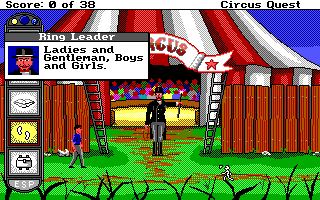
Developer Cloudee built this short adventure for the April 2010 SCI Community Competition, using Sierra's Creative Interpreter engine. It imitates the early parser-less era of adventure games right down to the crisp pixels, the sound profile, and the classic score system, which tops out at a maximum of 38 points.
Because the environment is only three screens wide, the scope is tight, but the puzzles quickly get tricky. You collect a typical adventure-game pile of junk: a free balloon, a poster, some circus peanuts, and a smelly old boot complete with its shoelace. The logic starts simply enough by trading items to get the teenager her cotton candy, but the game hits a massive wall when you start poking around the perimeter fence.
The wall in question is a mysterious knot hole in the wooden fence. Getting past the main gate is already tough, but solving the knot hole puzzle is where most players get thoroughly stuck. If you do not figure out exactly how to combine your odd inventory items with the fence, your run hard-stops at 23 out of 38 points. It is classic Sierra-style lateral thinking: frustrating, slightly absurd, and happy to make you click every item on every pixel.
Even coming out in 2010, it deliberately preserves the quirks that made old PC games infuriating. There are no built-in hint systems or highlighted hotspots. A review from the web show Random DOS Game Show (#1136) noted that the game hit players with "head-scratching puzzles" and tricky, hidden menus, even while correctly praising how it captured the nineties Sierra style.
The interface choices reflect that retro homage. While swapping the top bar for a persistent sidebar keeps the screen clean, finding your saved games or adjusting settings requires hunting through menus that are not immediately obvious. If you go in expecting modern quality-of-life features, the lack of keyboard navigation and sudden difficulty spikes will feel harsh.
Yet for anyone who spent their childhood typing SAVE GAME or trying to use a fish on a door in early VGA titles, those friction points are part of the authentic feel. It delivers that exact balance of crisp pixel art, oddball NPC dialogue, and brute-force inventory testing.
If you want to test your retro puzzle-solving skills against a stubborn fence and a short budget, you can play Circus Quest online free in your browser right here. There is nothing to install and no configuration needed; just load it up and see if you can hit the full 38 points without getting completely stumped by a knot hole.
Playing Circus Quest feels like stumbling across a lost Sierra floppy disk from 1991, except the whole thing was built as a homebrew MS-DOS project in 2010.
You play as a young boy dumped outside a travelling show with twenty dollars in his pocket. Admission to the big top is twenty-five, leaving you stranded across a tiny three-screen play area around the exterior of the tent while you try to scrape together the missing five bucks. There are no world-ending stakes or dramatic wizard duels here, just a kid trying to bypass a strict front gate.
The entire game plays out across those three static screens, populated by a small cast of regular circus archetypes: a ringleader barking for business, a unicycling clown selling cotton candy, and a teenage couple blocking a pathway because the girlfriend refuses to budge without a pink sugary snack. It is a tiny, self-contained setup that relies entirely on classic point-and-click inventory manipulation to move forward.
The screen layout ditches Sierra's traditional top menu bar in favour of a custom vertical sidebar on the right. You cycle through actions using the right mouse button or by picking icons directly: standard options like look, talk, and use are present, alongside a bizarre ESP button that sits on the toolbar waiting for a specific puzzle. It is an approachable, purely mouse-driven interface, though the complete lack of keyboard shortcuts means you will be clicking back and forth constantly.

Developer Cloudee built this short adventure for the April 2010 SCI Community Competition, using Sierra's Creative Interpreter engine. It imitates the early parser-less era of adventure games right down to the crisp pixels, the sound profile, and the classic score system, which tops out at a maximum of 38 points.
Because the environment is only three screens wide, the scope is tight, but the puzzles quickly get tricky. You collect a typical adventure-game pile of junk: a free balloon, a poster, some circus peanuts, and a smelly old boot complete with its shoelace. The logic starts simply enough by trading items to get the teenager her cotton candy, but the game hits a massive wall when you start poking around the perimeter fence.
The wall in question is a mysterious knot hole in the wooden fence. Getting past the main gate is already tough, but solving the knot hole puzzle is where most players get thoroughly stuck. If you do not figure out exactly how to combine your odd inventory items with the fence, your run hard-stops at 23 out of 38 points. It is classic Sierra-style lateral thinking: frustrating, slightly absurd, and happy to make you click every item on every pixel.

Even coming out in 2010, it deliberately preserves the quirks that made old PC games infuriating. There are no built-in hint systems or highlighted hotspots. A review from the web show Random DOS Game Show (#1136) noted that the game hit players with "head-scratching puzzles" and tricky, hidden menus, even while correctly praising how it captured the nineties Sierra style.
The interface choices reflect that retro homage. While swapping the top bar for a persistent sidebar keeps the screen clean, finding your saved games or adjusting settings requires hunting through menus that are not immediately obvious. If you go in expecting modern quality-of-life features, the lack of keyboard navigation and sudden difficulty spikes will feel harsh.
Yet for anyone who spent their childhood typing SAVE GAME or trying to use a fish on a door in early VGA titles, those friction points are part of the authentic feel. It delivers that exact balance of crisp pixel art, oddball NPC dialogue, and brute-force inventory testing.
If you want to test your retro puzzle-solving skills against a stubborn fence and a short budget, you can play Circus Quest online free in your browser right here. There is nothing to install and no configuration needed; just load it up and see if you can hit the full 38 points without getting completely stumped by a knot hole.
How Circus Quest is played — the keys the game listens to, grouped by what they do.
Highlighted keys are mapped — hover or tap one to see what it does.
The game is played entirely with the mouse using Sierra SCI point-and-click interface icons.
The on-screen keyboard and gamepad mapping the browser player uses on a phone, a tablet or a controller, as opposed to the real keys above. $PRO members make their own in the player and share them here; anyone can pick one to play with.
Cheat codes, console commands and memory pokes for Circus Quest — each one verified and attributed.
Sign in to submitHow Circus Quest is played — the keys the game listens to, grouped by what they do.
Highlighted keys are mapped — hover or tap one to see what it does.
The game is played entirely with the mouse using Sierra SCI point-and-click interface icons.
The on-screen keyboard and gamepad mapping the browser player uses on a phone, a tablet or a controller, as opposed to the real keys above. $PRO members make their own in the player and share them here; anyone can pick one to play with.
Cheat codes, console commands and memory pokes for Circus Quest — each one verified and attributed.
Sign in to submit