
King's Quest I: Quest for the Crown (1987)
Checking…
Stepping into King's Quest I: Quest for the Crown means guiding Sir Graham through the countryside of Daventry using arrow keys and a raw text parser to retrieve three lost royal treasures. Designed by Roberta Williams, this early graphic quest gives you complete freedom to wander into danger, make fatal mistakes, and figure out fairy-tale puzzles on your own terms.
Wandering through Daventry in King's Quest I: Quest for the Crown
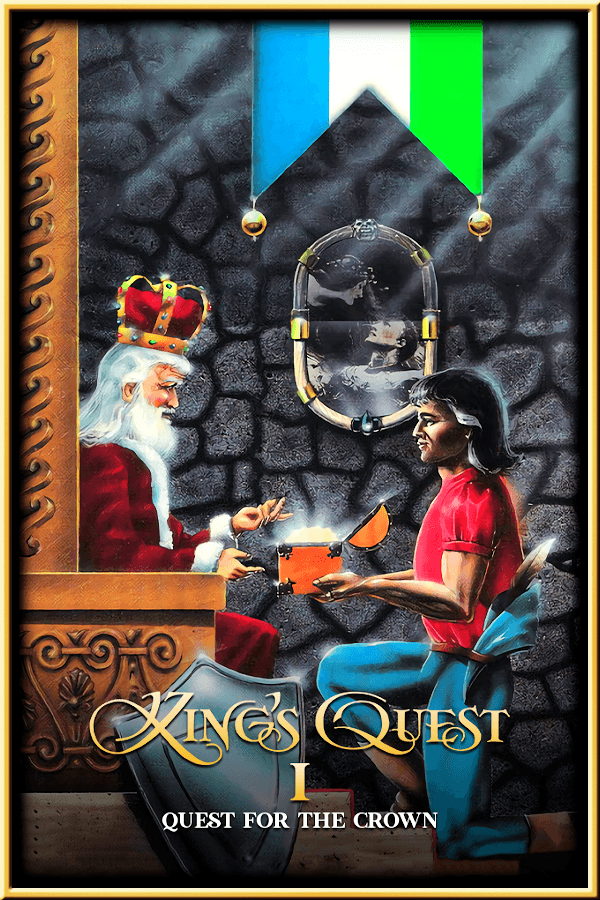
The journey opens outside Castle Daventry, where King Edward the Benevolent summons Sir Graham for a desperate task. The kingdom has fallen on hard times after three magical artifacts were stolen by trickery, and the dying king promises his crown to anyone brave enough to bring them back. You start with nothing but your cloak and an empty inventory, stepping out into an interconnected wilderness that loops around itself in every direction.
Your goal requires retrieving three distinct items scattered across the landscape:
- The magic shield that protects its bearer from all physical attacks.
- The magic mirror that reveals future visions when peered into.
- The treasure chest that stays permanently filled with gold coins.
Exploring the realm brings you face to face with a cast drawn straight from brothers Grimm storybooks. You will cross paths with a hungry ogre patrolling the woodland, a helpful fairy who grants brief invulnerability, a greedy bridge troll blocking your path, and an enigmatic gnome hiding underground. Because the map wraps continuously north to south and east to west, getting lost happens quickly until you draw a hand-drawn grid on paper.
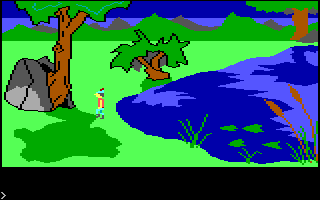
The Adventure Game Interpreter engine introduced pseudo-3D depth
When IBM commissioned Sierra On-Line to build an adventure to highlight the capabilities of the PCjr hardware, development took 18 months and a team of six people, running up an unheard-of budget near $850,000. Programmer Arthur Abraham prototyped the core tech that became the Adventure Game Interpreter engine. Rather than relying on static background pictures like older text adventures with illustrations, this system rendered a simulated three-dimensional plane.
That technical leap allowed Graham to walk in front of a tree trunk, behind a boulder, or down into a dark cavern. When Sierra re-released the 1987 MS-DOS version with full EGA color support and hard drive installation, it established the framework for an entire decade of animated quest games. Moving your character using arrow keys while typing precise text actions gave players a hands-on sense of position that purely text-based adventures could never match.
Where King's Quest I: Quest for the Crown breaks its own rules
Freedom of movement comes at a severe price. The parser, maintained by Sierra On-Line, Inc., demands exact vocabulary that turns simple interactions into trial-and-error typing drills. If you inspect an fallen tree, typing LOOK LOG yields a blank refusal, forcing you to guess that the game expects LOOK STUMP instead. That vocabulary wall stalls momentum far more often than the actual riddles do.
Movement controls pose an equal hazard on modern hardware. Without careful processor throttles, set speed controls turn Graham's walk into an uncontrollable sprint where a fraction of a second sends him tumbling off a cliff or drowning in a moat. Sudden deaths occur constantly, often without warning. Worse still are the dead-end states: if you eat a specific piece of food early on or drop a required puzzle item in the wrong spot, the game allows you to keep playing for hours even though victory has become impossible.
Guessing the gnome's name and surviving parser traps
The standard logic behind most puzzles relies on familiarity with classic folklore. You might use a goat to deal with a stubborn bridge troll or take to the skies with the help of a giant condor. However, the game occasionally throws a curveball that leaves players completely stuck. The gnome's name puzzle is the ultimate example of unfair puzzle design.
When you encounter the gnome, natural instinct leads you to guess Rumpelstiltskin. The game rejects that answer immediately. The actual solution requires applying a backwards alphabet cipher to the name, turning 'A' into 'Z' and 'B' into 'Y', which yields the absurd string "Nikstlitselpmur". Finding alternative methods to cross the river or earning extra points by discovering non-lethal solutions gives this adventure game high replay value, provided you save your progress in multiple slots.
How to play King's Quest I: Quest for the Crown online today
Despite its unforgiving death traps, finicky syntax, and brutal dead ends, this initial adventure laid down the template for dynamic graphic quests. Anyone who enjoys classic puzzle design should take a crack at Sir Graham's initial outing to experience how animated graphics first merged with text commands.
If you want to experience this King's Quest I: Quest for the Crown MS-DOS game without configuring vintage hardware or mount points, you can play King's Quest I: Quest for the Crown free in your browser right here. It loads directly in your browser with zero installation needed, letting you test your typing skills, map the wilderness of Daventry, and claim the royal crown in a matter of seconds.
How King's Quest I: Quest for the Crown (1987) is played — the keys the game listens to, grouped by what they do.
- Movement
- Action
- Interface
Highlighted keys are mapped — hover or tap one to see what it does.
The player must press Ctrl-J to calibrate a connected joystick if using one.
Players' controls
Touch and gamepad controls
The on-screen keyboard and gamepad mapping the browser player uses on a phone, a tablet or a controller, as opposed to the real keys above. $PRO members make their own in the player and share them here; anyone can pick one to play with.
Make your own touch controlsPRO
- 1Open the editorSign in below, then pick what to make. The game starts with the editor open over it.
- 2Place your keysAdd keys and drag them where your thumbs rest, or map a controller's buttons. Test plays the game with them; Save keeps them, and you play with them from then on.
- 3Share themShare them right after saving in the game, or name and share them here. Players vote, and the best become this game's controls for everyone.
Go PROSee how it worksSign in+20 XP for sharing · +50 XP if yours become the game's own
- The game's own controlsKeyboardGamepadWhat every player starts with.In use
2 screenshots
From the archive
No gameplay video yet
No gameplay video for King's Quest I: Quest for the Crown (1987) yet. Sign in to add one.
No reviews yet
Tell the community what you think of King's Quest I: Quest for the Crown (1987). Reviews are public and tied to your username.
No archived manuals for King's Quest I: Quest for the Crown (1987) yet
No manuals archived for this title yet. Sign in to upload the first scan.
Cheat codes, console commands and memory pokes for King's Quest I: Quest for the Crown (1987) — each one verified and attributed.
Sign in to submitNo cheats yet for this title
Know a working cheat, poke or trainer? Add it with the button above. Moderators check every entry before it goes live.
No archived soundtrack for King's Quest I: Quest for the Crown (1987) yet
No soundtrack archived for this title yet. Sign in to upload the first rip.
No save states for King's Quest I: Quest for the Crown (1987) yet
No save states for this title yet. Sign in to share one.
Discussions
Sign in to post- Threads0
- Total posts0
- Online now6
Community · King's Quest I: Quest for the Crown (1987)
Who's contributing, and what's new
- Reviews0
- Threads0
- Uploadsapproved0
- Contributors0
Recent activity
Nothing here yet
Reviews, discussion threads and approved uploads appear here as members add them.