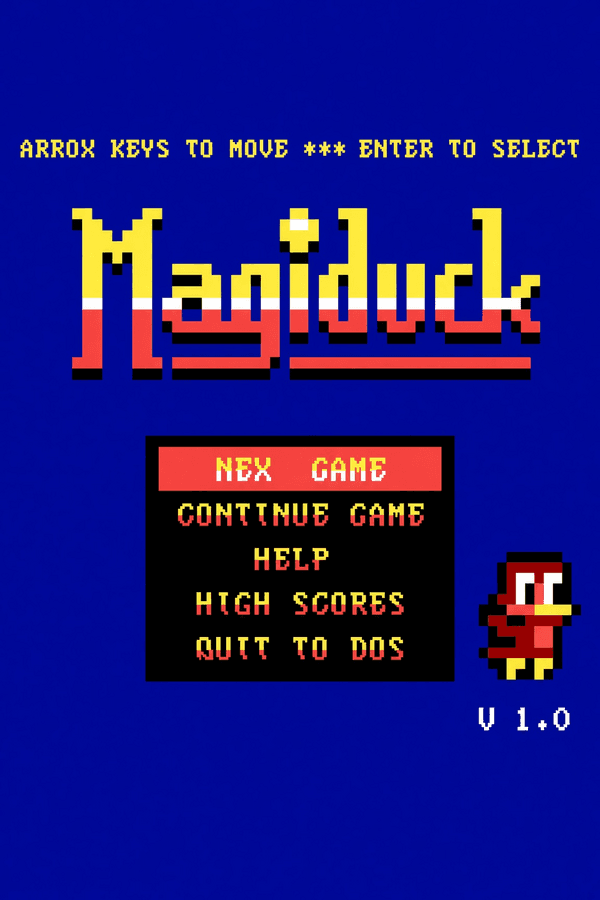
MagiDuck
Rate this game
- Played
- Rarely
MagiDuck might look like a lost side-scroller from the early eighties, but developer Toni Svenström released this MS-DOS game in 2018 to show just how far you could push standard PC text modes.
Toni Svenström pulled sixteen colors out of plain CGA text
At first glance, MagiDuck looks like a typical 2D scrolling title running on an old color monitor, yet the display trick under the hood is pure hardware wizardry. The game forces an IBM PC CGA graphics card into a tweaked 40x25 text mode, using custom ASCII character blocks to create a pseudo-pixel resolution of 80x50 with 16 display colors. It runs happily on a classic 8088 processor clocked at 4.77 MHz with 256 KB of RAM, outputting audio strictly through the internal PC speaker.
That low resolution gives the graphics an inherent blockiness, but the sprites move at a steady frame rate without the ugly tearing that plagued so many early DOS platform games. The source code was made publicly available as Freeware, allowing anyone interested in vintage x86 assembly and display hacks to inspect how the low-level rendering works.
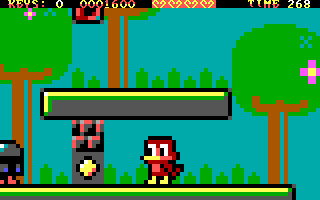
What it actually feels like to shoot fireballs in MagiDuck
You play as a brave little duck who returns home to find her family castle under siege while her parents are away. Despite having wings, this protagonist cannot fly, meaning you have to rely entirely on running, jumping, and shooting fireballs to climb the structure. Enemies like the round "Eggy" and the armored "Helmet" patrol the floors, forcing you to time your fireball shots carefully while leaping over spikes.
Direct movement controls feel surprisingly crisp and responsive, though the viewport presents a real gameplay hurdle. Because the text-mode screen resolution is so low, the camera view sits slightly zoomed-in on your character. That tight framing means you sometimes have very little time to react when enemies slide onto the screen from a ledge above, making quick reflexes essential for survival in this action game.
Ten non-linear stages stand between you and the castle tower
Rather than pushing you down a rigid linear corridor, MagiDuck grants access to ten castle levels that you can tackle in whatever order you prefer. Exploring these stages requires more than simply reaching the exit doorway at the end of a floor. Each level conceals a hidden star, and gathering all ten stars is mandatory if you want to unlock the final boss battle at the peak of the tower.
Along the way, you pick up extra collectibles to boost your score and keep your momentum going:
- Golden coins scattered across basic platform ledges
- Valuable jewels tucked inside tricky side-paths
- Hidden stars required to access the ultimate boss chamber
To keep players from losing all their progress during a long session, the software includes an internal console-style save and load feature alongside a built-in help guide. You can set up your run, save your progress after securing a tough star, and resume without needing external utility programs.
Where this clever retro experiment lands today
What makes MagiDuck work on MS-DOS is that it never lets its low-tech gimmick get in the way of responsive platforming. While the tight screen framing occasionally leads to surprise enemy hits, the smooth jump arcs and quick fireball shooting make exploring the tower fun. It shows how much you can squeeze out of classic hardware when the controls are properly tuned.
You can play MagiDuck online free in your browser without worrying about emulators or hardware settings. Launching the game directly reveals just how smoothly the custom character engine animates once you take direct control of the fireball-throwing duck.
How MagiDuck is played — the keys the game listens to, grouped by what they do.
- Movement
- Action
- Interface
Highlighted keys are mapped — hover or tap one to see what it does.
Players' controls
Touch and gamepad controls
The on-screen keyboard and gamepad mapping the browser player uses on a phone, a tablet or a controller, as opposed to the real keys above. $PRO members make their own in the player and share them here; anyone can pick one to play with.
Make your own touch controlsPRO
- 1Open the editorSign in below, then pick what to make. The game starts with the editor open over it.
- 2Place your keysAdd keys and drag them where your thumbs rest, or map a controller's buttons. Test plays the game with them; Save keeps them, and you play with them from then on.
- 3Share themShare them right after saving in the game, or name and share them here. Players vote, and the best become this game's controls for everyone.
Go PROSee how it worksSign in+20 XP for sharing · +50 XP if yours become the game's own
- The game's own controlsKeyboardGamepadWhat every player starts with.In use
2 screenshots
From the archive
No reviews yet
Tell the community what you think of MagiDuck. Reviews are public and tied to your username.
No archived manuals for MagiDuck yet
No manuals archived for this title yet. Sign in to upload the first scan.
Cheat codes, console commands and memory pokes for MagiDuck — each one verified and attributed.
Sign in to submitNo cheats yet for this title
Know a working cheat, poke or trainer? Add it with the button above. Moderators check every entry before it goes live.
No archived soundtrack for MagiDuck yet
No soundtrack archived for this title yet. Sign in to upload the first rip.
No save states for MagiDuck yet
No save states for this title yet. Sign in to share one.
Discussions
Sign in to post- Threads0
- Total posts0
- Online now6
Community · MagiDuck
Who's contributing, and what's new
- Reviews0
- Threads0
- Uploadsapproved0
- Contributors0
Recent activity
Nothing here yet
Reviews, discussion threads and approved uploads appear here as members add them.