
Dropping explosives on three friends squeezed around a single keyboard makes PeaceMaker an immediate recipe for frantic elbowing and accidental key-ghosting. It takes the classic grid-based bombing formula and brings custom level building straight to PC desktops.
When four people sit shoulder to shoulder at one desk, PC gaming stops being a quiet solitary affair. The initial match of PeaceMaker usually begins with everyone arguing over who gets the arrow keys and who gets stuck trying to move with obscure numeric keypad combinations or awkward letter blocks. Once the countdown finishes, the screen erupts into panic as four avatars start clearing soft blocks to carve out basic escape routes.
That immediate friction defines the entire experience. Unlike console action titles that relied on dedicated controller ports, this 1996 strategy and tactics game forces players to share a tiny physical footprint. If two players press three keys simultaneously on an old AT keyboard, someone's input drops, leaving an avatar standing helpless right next to a ticking fuse.
Power-ups, grid layouts, and the art of self-trapping in PeaceMaker
The core loop follows the classic arena framework closely. You drop a bomb, step back behind a solid wall, and wait for the cross-shaped fire blast to clear out destructible obstacles. Soft blocks break open to drop upgrades, exposing speed boots, blast-radius expanders, and extra bomb capacity pick-ups that quickly turn quiet corridors into lethal hazard zones.
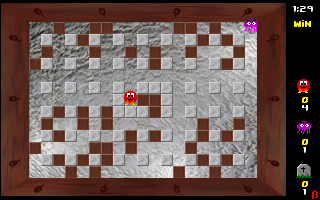
Strategy boils down to calculating grid distances while anticipating where your opponents will run out of options. Misjudging your bomb count is the easiest way to blow yourself up, especially when an upgrade increases your explosion range past what your brain expected. Trapping an opponent in a dead end by dropping two bombs in quick succession feels great, right up until you realize you blocked your own exit path in the process.
The tactical pacing relies heavily on spatial awareness. In wider stages, matches start slow as players farm upgrades from isolated corners of the screen. In narrower arenas, blood matches happen in seconds because one well-placed explosive can seal off half the map before anyone picks up a single speed upgrade.
Custom arena creation gives creative players real control
Beyond the standard rotation of stages, the custom map mode is where you end up spending most of your time. Instead of relying purely on pre-built layouts, you hop into the built-in editor and draw your own grid configurations from scratch. You can place unbreakable concrete pillars to form maze-like corridors, scatter dense clusters of breakable tiles, or design wide-open killing fields with zero cover.

Creating customized maps changes how local multiplayer plays out over an evening. If one player dominates standard levels through raw speed, you can build a claustrophobic maze packed with solid barriers to level the playing field. The editor interface is straightforward enough that designing a fresh battleground takes under two minutes before jumping straight back into action.
This level of player control was standard for PC shareware fans of the era who loved tweaking games to fit their group's house rules. Independent developer François Beaune focused on getting players into customized matches quickly, making map construction feel like a natural extension of regular play rather than a buried developer tool.
Where local arena games struggle on vintage hardware
Playing an arena action game on a single system comes with obvious mechanical drawbacks. The interface offers no handicap settings or AI bot options, meaning single-player practice is practically nonexistent. If you do not have at least one or two friends ready to share your desk, the title loses most of its appeal immediately.
Sound design across MS-DOS combat titles in 1996 varied wildy depending on your hardware, and here the audio stays basic. Standard sound cards deliver functional explosion noises and pickup clicks, but there is little atmosphere beyond the crunch of breaking blocks and keypress clatter. Visually, clear color coding keeps track of four distinct characters, even if environmental tiles remain simple static graphics.
Here is what you have to manage during every round:
-
Match Essentials:
- Carving initial pathways through destructible walls without sealing off your own retreat line.
- Snagging radius upgrades early to out-range opponents across long corridors.
- Managing keyboard real estate so your hand position does not block your neighbor's movements.
- Designing custom choke points in the map editor to counter aggressive opponents.
Despite these hardware limits, published releases by MicroGames filled a very specific niche for LAN parties and office PCs where extra gamepads were rarely plugged in. It took a proven console genre and delivered an accessible PC alternative designed around simple desk-sharing mechanics.
How to jump into a quick match right now
If you want a straightforward action game to test with friends on a lunch break, this title delivers fast local action with zero friction. The standard rules are simple to learn, while custom grid creation lets you invent your own frantic scenarios once the basic maps get predictable.
You can play PeaceMaker free in your browser right now with no setup and nothing to install. Load up this classic PeaceMaker MS-DOS game directly on this page, gather a few people around the keyboard, set up a custom map, and see who survives the first blast.