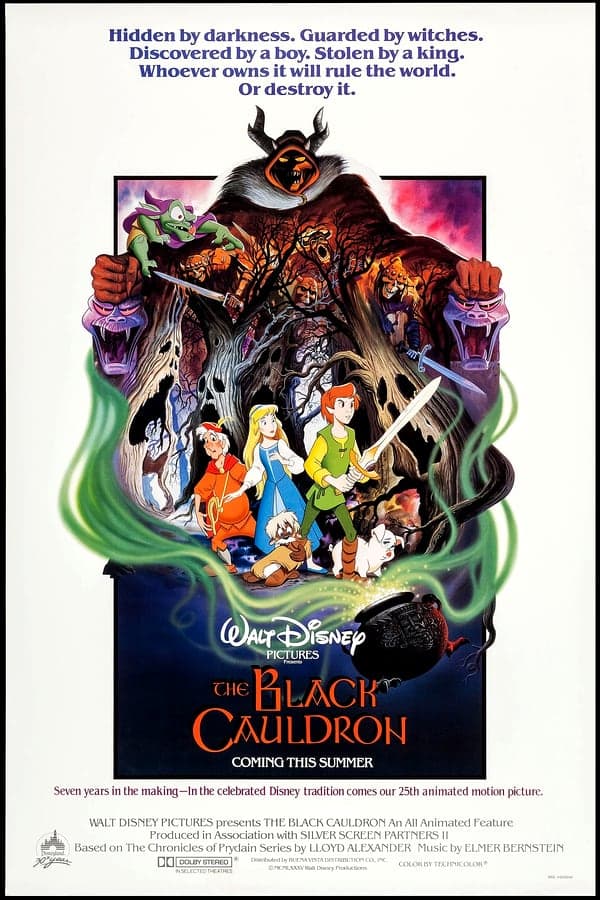

Playing The Black Cauldron with a mouse instead of typing text commands fundamentally changes how you navigate Prydain's deadly forests and castles. This fan-built point-and-click adaptation translates Sierra's early design into a modern parser-free interface while keeping every sudden death intact.
Replacing text parsers with point-and-click simplicity in The Black Cauldron
The original release forced players to type fast enough to outrun hungry ghouls and patrolling guards. Stripping away the command prompt in favor of icon-based interaction makes pixel hunting the primary obstacle instead of speed typing. You spend your first ten minutes clicking around Taran's farm, grabbing bread, and trying not to let Hen Wen the pig wander off before the Horned King's undead soldiers arrive.
Swapping text inputs for a mouse cursor cleans up the screen layout. Instead of fighting with vocabulary guessing games, you cycle through standard action icons to look at items, pick up object clutter, or talk to villagers. It gives the adventure a feel closer to later Sierra titles built on the SCI engine, removing the friction of typing while retaining the exact room layouts and story beats of the source material.
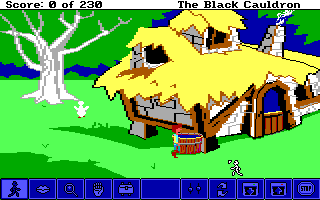
Even with mouse controls, the layout of every screen demands careful exploration. You still stumble across instant game-over scenarios by stepping off marked paths or failing to keep essential survival items in your inventory. The transition to pure mouse navigation highlights how small the original game was, as you can run through multiple flip-screen locations in seconds if you know where to click.
Inventory management and lateral thinking in fantasy adventures
Survival depends on gathering seemingly trivial props early in the story. A piece of corn, a flask of water, or a quiet apple can mean the difference between passing a hurdle or starting over from your last save file. If you leave Taran's home area without securing basic food supplies, you will find yourself starved or stuck several screens down the road with no way to backtrack.
This design comes directly from classic adventure games produced during Sierra's early era. Solutions to puzzles do not always rely on high fantasy magic, but rather on practical item application. You throw food to distract aggressive creatures, use ropes to climb down drops, and search dark rooms carefully to spot small pixels that hide vital tools.
Here is what you need to track during a typical playthrough:
- Collecting food items before leaving safe areas to avoid starving during long journeys.
- Finding hidden keys and sharp tools to break out of dungeon cells.
- Managing light sources when exploring dark subterranean caverns.
- Trading items with odd characters to secure safe passage past heavy guards.
Dungeon escapes and sudden game over screens
Getting captured by the Horned King's forces sends you straight into the dungeon of Castle Death. Escaping requires logical inventory usage, spatial awareness, and good timing. You must search your cell, find loose bricks or hidden passages, and avoid drawing the attention of patrolling guards who show no mercy if they spot you out of bounds.
The penalty for failure remains sharp throughout the entire campaign. One wrong step near a cliff side or a delayed action inside a guard room ends your run immediately. Because the interface is faster than typing, dying happens even quicker than before, making regular saving essential if you want to make steady progress without repeating long sections.
Many fans who played early fantasy titles will remember the frustration of reaching a late stage only to realize an essential item was left behind three chapters ago. That strict design approach is present here without softening. If you forget to grab a specific rope or key early on, you will eventually hit a dead end where starting over is your only path forward.
Evaluating this fan release from 2010
As a project distributed by Freeware creators, this release strips away old input barriers while respecting the source logic. It functions as a curious experiment in retro conversion: taking a game designed around keyboard commands and retrofitting it into a standard point-and-select framework. The clean graphics and mouse integration show how much interface design evolved between the mid-1980s and later DOS releases.
What holds up is the pacing and the atmospheric presentation of Prydain. What fails to impress is the unforgiving puzzle structure that punishes casual experimentation with permanent dead ends. It suits fans who enjoy old-school logic puzzles and want to experience the narrative without wrestling with an unforgiving text parser.
If you want to experience a classic fantasy quest with modern mouse control, you can play The Black Cauldron online right now. It runs smoothly directly inside your web browser, letting you test your survival skills against Castle Death without setting up disk images or adjusting configuration settings.
How to play The Black Cauldron free in your browser right now
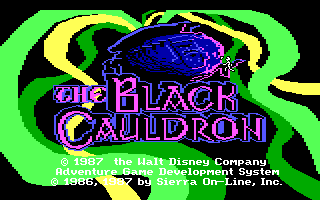
You can launch The Black Cauldron free in your browser right below this article without downloading extra software. The MS-DOS game version loads directly in your active tab with full mouse support enabled from the title screen.
When you start your session, immediately search Taran's yard and stock up on every visible item before moving south into the forest. You will notice right away how much faster exploration feels when clicking around screens, but do not let the smooth controls fool you into skipping saves before entering unfamiliar territory.
How The Black Cauldron is played — the keys the game listens to, grouped by what they do.
- Movement
- Look
- Action
- Interface
Highlighted keys are mapped — hover or tap one to see what it does.
Typing is not required except when entering a save game name. Game speed can be adjusted by typing slow, normal, or fast.
Players' controls
Touch and gamepad controls
The on-screen keyboard and gamepad mapping the browser player uses on a phone, a tablet or a controller, as opposed to the real keys above. $PRO members make their own in the player and share them here; anyone can pick one to play with.
Make your own touch controlsPRO
- 1Open the editorSign in below, then pick what to make. The game starts with the editor open over it.
- 2Place your keysAdd keys and drag them where your thumbs rest, or map a controller's buttons. Test plays the game with them; Save keeps them, and you play with them from then on.
- 3Share themShare them right after saving in the game, or name and share them here. Players vote, and the best become this game's controls for everyone.
Go PROSee how it worksSign in+20 XP for sharing · +50 XP if yours become the game's own
- The game's own controlsKeyboardGamepadWhat every player starts with.In use
2 screenshots
From the archive
No gameplay video yet
No gameplay video for The Black Cauldron yet. Sign in to add one.
No reviews yet
Tell the community what you think of The Black Cauldron. Reviews are public and tied to your username.
No archived manuals for The Black Cauldron yet
No manuals archived for this title yet. Sign in to upload the first scan.
Cheat codes, console commands and memory pokes for The Black Cauldron — each one verified and attributed.
Sign in to submitNo cheats yet for this title
Know a working cheat, poke or trainer? Add it with the button above. Moderators check every entry before it goes live.
No archived soundtrack for The Black Cauldron yet
No soundtrack archived for this title yet. Sign in to upload the first rip.
No save states for The Black Cauldron yet
No save states for this title yet. Sign in to share one.
Discussions
Sign in to post- Threads0
- Total posts0
- Online now6
Community · The Black Cauldron
Who's contributing, and what's new
- Reviews0
- Threads0
- Uploadsapproved0
- Contributors0
Recent activity
Nothing here yet
Reviews, discussion threads and approved uploads appear here as members add them.