
Original Apple II programmer Jay Sullivan adapted the arcade formula of Targ to create Crossfire, a top-down shooter that traps you in a grid of city streets under attack from every side.
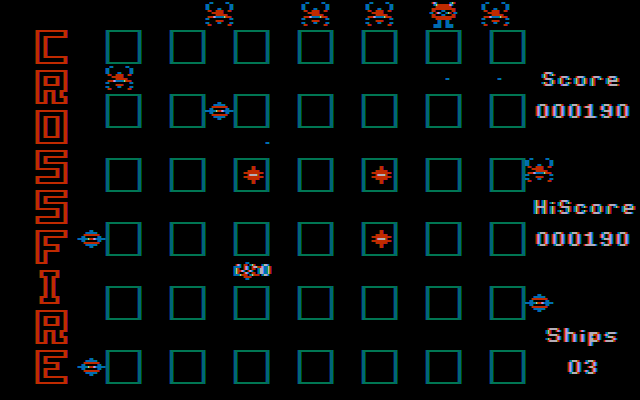
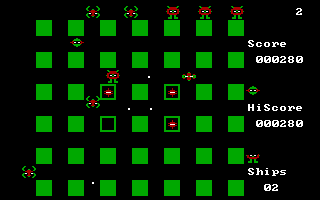
You start near the center of a grid made of 42 city blocks and 30 intersections. Alien beasts enter from the outer edges, crawling along the avenues toward your position. You have to navigate the tight corners of the map while shooting back, turning every junction into a quick decision about survival.
The control layout demands two hands on the keyboard. You use IJKL to steer your craft and ESDF to aim your shots in four cardinal directions. Many players find this setup awkward at first, but it gives you true dual-stick independence on early PC hardware.
If you prefer, a standard digital joystick works fine, but the keyboard layout lets you fire sideways while retreating down an alley. That trick is essential when half a dozen invaders try to pin you against the edge of the screen.
You cannot simply hold down the fire key. You begin each level with 35 missiles, and your count decreases in later rounds. When your stash drops to 10, a reloading station appears somewhere in the grid, forcing you to cross hostile territory just to top off your supply.
Shooting an alien does not destroy it right away. Each hit cycles the enemy through four distinct transformations before it finally vanishes from the grid. This multi-stage destruction changes how you prioritize targets across the board.
Score points and survival rely on a few strict mechanical rules:
That final swarm mechanic catches plenty of new players off guard. Clearing out most of the wave feels manageable until those last five invaders accelerate and track your movement together.
Developer Sierra On-Line originally published the title for the Apple II before bringing the game to IBM systems in 1982. Programmer Jay Sullivan teamed up with Frank Randak to port the code to the PC boot format, bypassing standard DOS command prompts entirely.
Published by IBM, the early PC boot version relied on CGA composite display modes tuned for the 4.77MHz 8088 processor. Sound effects come through the internal PC speaker, providing sharp beeps for laser fire and reloading cues.
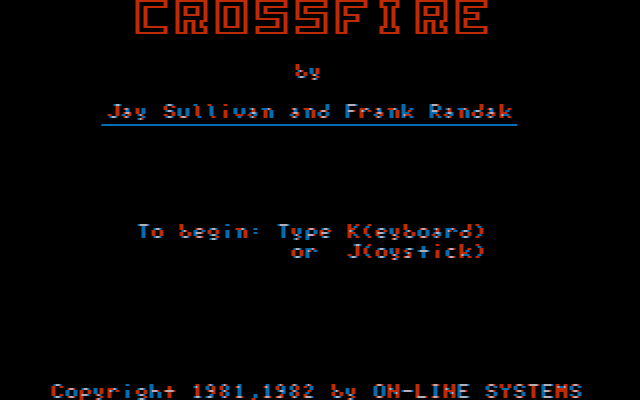
Sierra later issued the title under their SierraVision budget budget label in 1983. A later update for the IBM PCjr hardware even added an animated soundtrack featuring a chip-tune rendition of the Peter Gunn theme song.
Period magazine writers praised the fluid movement and demanding strategy. Softalk highlighted the intense concentration needed to keep your craft moving without walking straight into an incoming missile. PCjr Magazine described the fast pace as a constant struggle where you either stay aggressive or get trapped.
Modern retro reviews are often harsher on the visual presentation. Retrospective coverage on C64-Wiki notes that the street blocks look blocky and simple, even compared to other arcade ports from the early eighties. The grid lines lack detail, serving purely as functional boundaries for your ship.
The real issue is the control scheme. Reaching across the keyboard for simultaneous movement and firing takes several rounds to feel natural. If your fingers slip off the home row during a swarm, your run ends in seconds.
The core design holds up surprisingly well if you enjoy raw, twitch-focused action games. The tension of managing limited missiles while dodging four-way crossfire delivers genuine excitement. What fails to impress is the visual variety, as every level uses the same street layout with faster enemy spawns.
Anyone who likes twin-stick shooters or early PC history should give this grid fighter a shot. The fast pacing makes it ideal for quick sessions where you try to beat your personal high score.
You can play Crossfire online free in your browser right now with no setup required. When you boot up the Crossfire MS-DOS game, try using the standard keyboard controls to get a feel for split-second direction changes before the final five aliens start their swarm.
Original Apple II programmer Jay Sullivan adapted the arcade formula of Targ to create Crossfire, a top-down shooter that traps you in a grid of city streets under attack from every side.
You start near the center of a grid made of 42 city blocks and 30 intersections. Alien beasts enter from the outer edges, crawling along the avenues toward your position. You have to navigate the tight corners of the map while shooting back, turning every junction into a quick decision about survival.
The control layout demands two hands on the keyboard. You use IJKL to steer your craft and ESDF to aim your shots in four cardinal directions. Many players find this setup awkward at first, but it gives you true dual-stick independence on early PC hardware.
If you prefer, a standard digital joystick works fine, but the keyboard layout lets you fire sideways while retreating down an alley. That trick is essential when half a dozen invaders try to pin you against the edge of the screen.
You cannot simply hold down the fire key. You begin each level with 35 missiles, and your count decreases in later rounds. When your stash drops to 10, a reloading station appears somewhere in the grid, forcing you to cross hostile territory just to top off your supply.
Shooting an alien does not destroy it right away. Each hit cycles the enemy through four distinct transformations before it finally vanishes from the grid. This multi-stage destruction changes how you prioritize targets across the board.
Score points and survival rely on a few strict mechanical rules:
That final swarm mechanic catches plenty of new players off guard. Clearing out most of the wave feels manageable until those last five invaders accelerate and track your movement together.
Developer Sierra On-Line originally published the title for the Apple II before bringing the game to IBM systems in 1982. Programmer Jay Sullivan teamed up with Frank Randak to port the code to the PC boot format, bypassing standard DOS command prompts entirely.
Published by IBM, the early PC boot version relied on CGA composite display modes tuned for the 4.77MHz 8088 processor. Sound effects come through the internal PC speaker, providing sharp beeps for laser fire and reloading cues.
Sierra later issued the title under their SierraVision budget budget label in 1983. A later update for the IBM PCjr hardware even added an animated soundtrack featuring a chip-tune rendition of the Peter Gunn theme song.
Period magazine writers praised the fluid movement and demanding strategy. Softalk highlighted the intense concentration needed to keep your craft moving without walking straight into an incoming missile. PCjr Magazine described the fast pace as a constant struggle where you either stay aggressive or get trapped.
Modern retro reviews are often harsher on the visual presentation. Retrospective coverage on C64-Wiki notes that the street blocks look blocky and simple, even compared to other arcade ports from the early eighties. The grid lines lack detail, serving purely as functional boundaries for your ship.
The real issue is the control scheme. Reaching across the keyboard for simultaneous movement and firing takes several rounds to feel natural. If your fingers slip off the home row during a swarm, your run ends in seconds.
The core design holds up surprisingly well if you enjoy raw, twitch-focused action games. The tension of managing limited missiles while dodging four-way crossfire delivers genuine excitement. What fails to impress is the visual variety, as every level uses the same street layout with faster enemy spawns.
Anyone who likes twin-stick shooters or early PC history should give this grid fighter a shot. The fast pacing makes it ideal for quick sessions where you try to beat your personal high score.
You can play Crossfire online free in your browser right now with no setup required. When you boot up the Crossfire MS-DOS game, try using the standard keyboard controls to get a feel for split-second direction changes before the final five aliens start their swarm.
How Crossfire is played — the keys the game listens to, grouped by what they do.
Highlighted keys are mapped — hover or tap one to see what it does.
Keyboard controls allow independent movement (I/J/K/L) and firing (E/S/D/F) in four directions. Movement keys can be redefined using CTRL C.
The on-screen keyboard and gamepad mapping the browser player uses on a phone, a tablet or a controller, as opposed to the real keys above. $PRO members make their own in the player and share them here; anyone can pick one to play with.
Cheat codes, console commands and memory pokes for Crossfire — each one verified and attributed.
Sign in to submitHow Crossfire is played — the keys the game listens to, grouped by what they do.
Highlighted keys are mapped — hover or tap one to see what it does.
Keyboard controls allow independent movement (I/J/K/L) and firing (E/S/D/F) in four directions. Movement keys can be redefined using CTRL C.
The on-screen keyboard and gamepad mapping the browser player uses on a phone, a tablet or a controller, as opposed to the real keys above. $PRO members make their own in the player and share them here; anyone can pick one to play with.
Cheat codes, console commands and memory pokes for Crossfire — each one verified and attributed.
Sign in to submit