
FIFA Soccer 97 promised a technological leap forward with polygonal player models and real-time motion capture, though the reality on PC was a heavy, sluggish game that ran best when you abandoned traditional outdoor pitches for the fast-paced indoor arena.
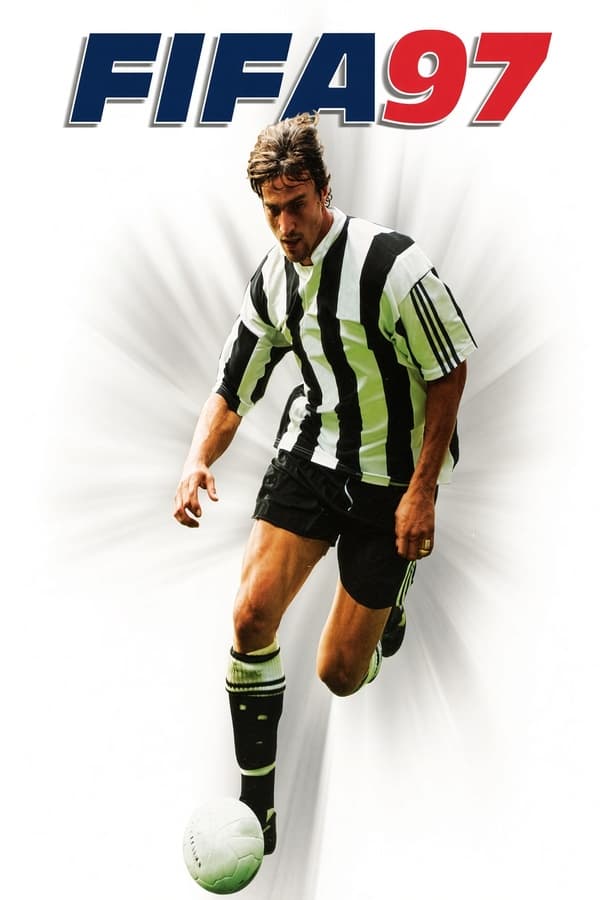
When you loaded up this title in the winter of 1996, the jump in visual presentation was immediately obvious. EA Canada, working under the Extended Play Productions name, abandoned the 2D player sprites of previous years and rebuilt the match engine around 3D polygonal models. French star David Ginola went into a motion-capture suit to supply the player movements, which were stitched together using a system called Motion Blending. On the cover, Ginola graced the European boxes while Brazilian international Bebeto featured on releases in the Americas.
The audio side received just as much care from publisher EA Sports. Broadcast veteran John Motson called the action alongside analyst Andy Gray, while television anchor Des Lynam handled match introductions and halftime breaks. Hear a line of commentary drop right as a volley hits the crossbar and you can see what the developers were aiming for: a complete broadcast presentation inside an MS-DOS sports simulation.
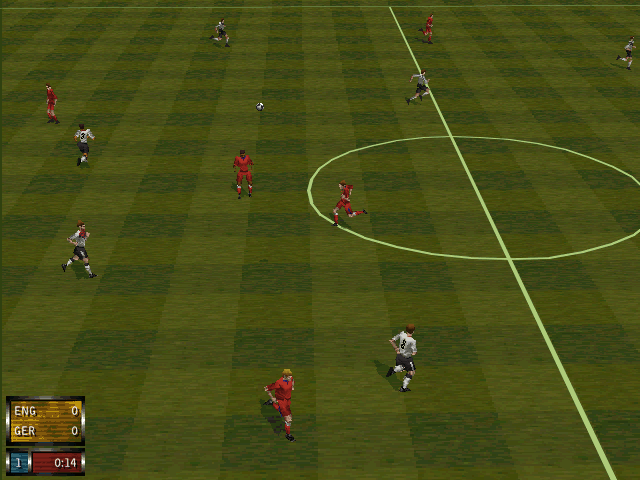
The standard 11-a-side game offered six distinct play modes, ranging from simple friendlies to full domestic leagues like the English Premier League, Serie A, the Bundesliga, and Ligue 1. You could dial in your preferred style by toggling mechanical helpers on or off depending on whether you wanted an arcade experience or a strict simulation:
Where FIFA Soccer 97 comes alive, however, is in its walled 6-on-6 indoor soccer mode. Played on a smaller synthetic field enclosed by solid glass walls, it completely eliminates out-of-bounds stoppages. There are no throw-ins, no corner kicks, and no goal kicks. When a shot misses the net, the ball rebounds hard off the back wall and rebounds straight into the box, leading to chaotic scrambles and non-stop shooting opportunities. It transforms a slow-paced simulation into an urgent game of wall passes and immediate volleys.
Step onto a full-sized outdoor pitch, however, and the frame rate struggles begin to weigh down the experience. Running the FIFA Soccer 97 MS-DOS game on mid-range hardware meant dealing with substantial input delay. Pressing the pass button did not mean your midfielder passed the ball right then; it meant he initiated a turning animation, lined up his kicking foot, and finally struck the ball a full second after your input. If an opposing defender sprinted into your path during that animation sequence, you lost possession without ever having a chance to dodge.
At the time of release, magazines like PC Joker gave the DOS version an 85% rating, praising its detailed graphics and broadcast audio, while late-era retrospectives like Computer and Video Games scored the PC release at 90%. Yet even back then, reviewers pointed out that player movement felt heavy and unresponsive compared to rival arcade titles. Steering a winger down the touchline required turning in wide, sweeping arcs rather than making sharp cuts, making tight dribbling through a defensive line almost impossible.
If you set aside the sluggish responsiveness, the surrounding details show a team working hard to push the limits of interactive sports broadcasting. Interactive replay cameras allowed you to rotate the field angle, rewind, and zoom in on key fouls or long-range strikes. The player roster customization tools let you edit team compositions and player attributes, extending the life of league seasons well beyond the default squads.
I found that turning off strict refereeing and playing on the broadcast camera angle hid some of the rigid movement cycles, but it never fully erased the gap between visual ambition and input response. The game sat right in the awkward transitional phase between sprite-based speed and fully realized 3D physics, a hurdle that EA would not fully clear until the refined engine of FIFA 98: Road to World Cup arrived a year later.
The outdoor matches have aged poorly, ruined by sluggish turning circles and delayed button inputs that make defending frustrating. The indoor mode, by contrast, bypasses those flaws entirely by turning match flow into a frantic wall-bouncing shooter where fast reactions beat clumsy positioning. The audio work and commentary setups remain genuinely impressive technical feats from 1996.
You can play FIFA Soccer 97 online right now inside your browser with nothing to install and zero setup required. It costs nothing to boot up FIFA Soccer 97 free in your browser, pick a team in the indoor turf arena, and hammer low shots off the back walls to see how EA's first big experiment with 3D player models actually feels in your hands.
FIFA Soccer 97 promised a technological leap forward with polygonal player models and real-time motion capture, though the reality on PC was a heavy, sluggish game that ran best when you abandoned traditional outdoor pitches for the fast-paced indoor arena.
When you loaded up this title in the winter of 1996, the jump in visual presentation was immediately obvious. EA Canada, working under the Extended Play Productions name, abandoned the 2D player sprites of previous years and rebuilt the match engine around 3D polygonal models. French star David Ginola went into a motion-capture suit to supply the player movements, which were stitched together using a system called Motion Blending. On the cover, Ginola graced the European boxes while Brazilian international Bebeto featured on releases in the Americas.
The audio side received just as much care from publisher EA Sports. Broadcast veteran John Motson called the action alongside analyst Andy Gray, while television anchor Des Lynam handled match introductions and halftime breaks. Hear a line of commentary drop right as a volley hits the crossbar and you can see what the developers were aiming for: a complete broadcast presentation inside an MS-DOS sports simulation.
The standard 11-a-side game offered six distinct play modes, ranging from simple friendlies to full domestic leagues like the English Premier League, Serie A, the Bundesliga, and Ligue 1. You could dial in your preferred style by toggling mechanical helpers on or off depending on whether you wanted an arcade experience or a strict simulation:
Where FIFA Soccer 97 comes alive, however, is in its walled 6-on-6 indoor soccer mode. Played on a smaller synthetic field enclosed by solid glass walls, it completely eliminates out-of-bounds stoppages. There are no throw-ins, no corner kicks, and no goal kicks. When a shot misses the net, the ball rebounds hard off the back wall and rebounds straight into the box, leading to chaotic scrambles and non-stop shooting opportunities. It transforms a slow-paced simulation into an urgent game of wall passes and immediate volleys.
Step onto a full-sized outdoor pitch, however, and the frame rate struggles begin to weigh down the experience. Running the FIFA Soccer 97 MS-DOS game on mid-range hardware meant dealing with substantial input delay. Pressing the pass button did not mean your midfielder passed the ball right then; it meant he initiated a turning animation, lined up his kicking foot, and finally struck the ball a full second after your input. If an opposing defender sprinted into your path during that animation sequence, you lost possession without ever having a chance to dodge.
At the time of release, magazines like PC Joker gave the DOS version an 85% rating, praising its detailed graphics and broadcast audio, while late-era retrospectives like Computer and Video Games scored the PC release at 90%. Yet even back then, reviewers pointed out that player movement felt heavy and unresponsive compared to rival arcade titles. Steering a winger down the touchline required turning in wide, sweeping arcs rather than making sharp cuts, making tight dribbling through a defensive line almost impossible.
If you set aside the sluggish responsiveness, the surrounding details show a team working hard to push the limits of interactive sports broadcasting. Interactive replay cameras allowed you to rotate the field angle, rewind, and zoom in on key fouls or long-range strikes. The player roster customization tools let you edit team compositions and player attributes, extending the life of league seasons well beyond the default squads.
I found that turning off strict refereeing and playing on the broadcast camera angle hid some of the rigid movement cycles, but it never fully erased the gap between visual ambition and input response. The game sat right in the awkward transitional phase between sprite-based speed and fully realized 3D physics, a hurdle that EA would not fully clear until the refined engine of FIFA 98: Road to World Cup arrived a year later.
The outdoor matches have aged poorly, ruined by sluggish turning circles and delayed button inputs that make defending frustrating. The indoor mode, by contrast, bypasses those flaws entirely by turning match flow into a frantic wall-bouncing shooter where fast reactions beat clumsy positioning. The audio work and commentary setups remain genuinely impressive technical feats from 1996.
You can play FIFA Soccer 97 online right now inside your browser with nothing to install and zero setup required. It costs nothing to boot up FIFA Soccer 97 free in your browser, pick a team in the indoor turf arena, and hammer low shots off the back walls to see how EA's first big experiment with 3D player models actually feels in your hands.
How FIFA Soccer 97 is played — the keys the game listens to, grouped by what they do.
Highlighted keys are mapped — hover or tap one to see what it does.
To activate the Complex control set in controller selection, press the run button (button 2) on gamepads or toggle options on screen so control indicators turn yellow.
The on-screen keyboard and gamepad mapping the browser player uses on a phone, a tablet or a controller, as opposed to the real keys above. $PRO members make their own in the player and share them here; anyone can pick one to play with.
Cheat codes, console commands and memory pokes for FIFA Soccer 97 — each one verified and attributed.
Sign in to submitaka FIFA 97
How FIFA Soccer 97 is played — the keys the game listens to, grouped by what they do.
Highlighted keys are mapped — hover or tap one to see what it does.
To activate the Complex control set in controller selection, press the run button (button 2) on gamepads or toggle options on screen so control indicators turn yellow.
The on-screen keyboard and gamepad mapping the browser player uses on a phone, a tablet or a controller, as opposed to the real keys above. $PRO members make their own in the player and share them here; anyone can pick one to play with.
Cheat codes, console commands and memory pokes for FIFA Soccer 97 — each one verified and attributed.
Sign in to submit