Mavis Beacon Teaches Typing!
Mavis Beacon Teaches Typing! turned monotonous keyboard drills into a responsive, structured lesson plan back in 1987. Combining detailed performance metrics with a surprisingly competitive 3D drag race, this setup made learning home-row mechanics feel like an active, goal-driven pursuit.
Learning touch typing in Mavis Beacon Teaches Typing!
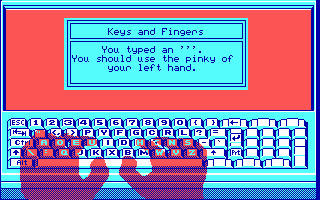
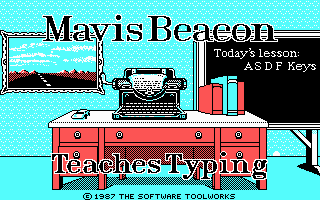
When you fire up the software, you get a structured classroom layout managed by a fictional tutor. Instead of dumping walls of plain text onto the screen, the interface displays a visual chalkboard along with guide hands positioned over a virtual keyboard layout. Your primary task is to type out the designated letter prompts using the correct fingers, starting right at the foundation on the home row with the standard "ASDF" keys.
The program supports both standard QWERTY and Dvorak layouts right from the start screen, a flexibility that was rarely prioritized during this era of educational games. If you drift off-key, on-screen ghost hands highlight exactly which finger should strike which key, reinforcing motor memory without forcing you to look down at your actual desk. The 4-color CGA visual style is simple, but the sharp layout and clear contrast keep your eyes focused on the scrolling characters.
The mechanics behind the chalkboard and hands
Behind the clean interface, the program acts as an adaptive system designed to target your specific weak points. Developers Norm Worthington, Walt Bilofsky, and Mike Duffy at The Software Toolworks, Inc. built an engine that records speed and accuracy across individual finger movements, calculating precise output metrics behind the scenes.
If you constantly mistype the letter "P" or struggle with shifting for capital letters, the lesson generator adjusts future drills to repeat those specific key combinations. The customized progress graphing feature tracks over twenty distinct parameters, letting you inspect your words-per-minute rates, accuracy trends, and finger error heatmaps. Reviewers at the time noted how user-friendly this detailed breakdown was, making it easy to isolate problem keys and design custom practice sessions.
A single key slip can disrupt your rhythm during a drill, forcing you to balance speed with careful precision. Because the program tracks raw error rates alongside speed, mashing keys quickly only degrades your final report card and triggers mandatory review drills.
Balancing speed and accuracy in the arcade race
When formal classroom drills become exhausting, the game offers a clever change of pace through its Arcade Racing minigame. In this mode, your typing speed directly controls a vehicle navigating a simulated 3D highway, racing against computer-driven opponents who match various skill thresholds.
Text blocks scroll across the bottom of the screen, and every correctly typed character acts as fuel to keep your speedometer climbing. However, the racing mode forces a tricky compromise that frustrated many players on retro forums. Hurrying to overtake an opponent leads to sloppy key presses, and hitting backspace or clearing mistakes bleeds valuable distance while your rival cruises past.
This dynamic turn of speed makes the arcade mode surprisingly tense. Winning higher-tier races requires steady composure under pressure, teaching you to maintain rapid output without descending into panic-induced typos when an opponent driver pulls alongside your rear bumper.
How Les Crane and Renée L'Espérance created an icon
One story behind the software is that Mavis Beacon herself is entirely fictional. The concept was crafted by former talk-show host Les Crane, who was a partner at the publishing house. To give the tutor an authentic face, the team hired Haitian-born model Renée L'Espérance, whom Crane spotted working at a cosmetics counter at a Saks Fifth Avenue store in Beverly Hills. The character's name combined singer Mavis Staples with the word "beacon" to signify light and guidance.
The marketing strategy initially hit an unexpected wall when several software distributors hesitated to stock the boxes because Mavis was portrayed by a Black woman. The Software Toolworks held firm, and as word-of-mouth spread about the software's effectiveness, retailers quickly reversed course to meet staggering consumer demand. The franchise eventually expanded across dozens of platforms and went on to sell millions of copies worldwide.
Even today, many who grew up typing in front of CRT monitors recall being convinced that Mavis was a real educator writing letters back to her students. That strong persona gave what could have been a dry utility the feel of a personal, one-on-one tutoring session.
Play Mavis Beacon Teaches Typing! online anytime
While modern touch-typing tutors are ubiquitous, returning to the original setup reveals just how well-designed its core loop really was. The feedback loop remains snappy, the error logging is surprisingly rigorous, and the CGA interface offers a clean, distraction-free environment. For anyone who spent hours trying to shave seconds off their lap times in the racing mode, loading up the original Mavis Beacon Teaches Typing! MS-DOS game offers a instant dose of responsive mechanical challenge.
You can run Mavis Beacon Teaches Typing! free in your browser right now with no setup required. Jump straight into the main desk view, choose between QWERTY or Dvorak, and test your speed against the computer drivers in the drag race to see if your home-row habits still hold up today.