Super Mario World DX
Landing a precise jump in Super Mario World DX takes a moment of awkward adjustment if you spent your childhood memorizing Nintendo button layouts, but watching raw Super Nintendo graphics scroll across an MS-DOS monitor in 2002 was a strange sight for PC gamers.
When Super Mario World DX brings console visuals to the PC
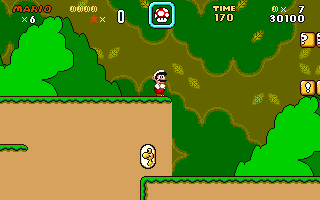
You hit the keyboard, Mario sprints across green Hills, and for a split second your brain tells you that you are looking at a Super Nintendo running through a TV set. The graphics are pulled straight from Nintendo assets, right down to the coin animations and enemy sprites. Yet the moment you reach for the arrow keys to make that first jump, the illusion fractures in a very specific way that anyone who played DOS platformers will instantly recognize.
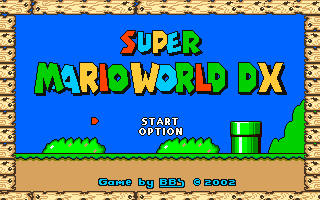
Instead of the natural layout of a gamepad, Super Mario World DX maps your standard platforming movement to the keyboard arrow keys, reserving S for your primary jump and D for the longer special jump. Opening the main menu requires navigate key combos like the arrow keys paired with A or S, while quitting back to your desktop takes an immediate press of Alt-X. It feels slightly clunky if you expect the pixel-perfect momentum of the original console engine, yet the code moves smoothly across the screen once your fingers adjust to the layout.
Spanish development outfit BB Software built this fan project using the DIV Games Studio suite, aiming for aesthetic authenticity above all else. They spent considerable time honing the movement mechanics to mimic the weight and inertia of the console original. While it never quite captures the exact physics of the original cartridge, running through a stage and lining up a high jump using the dedicated special jump key feels close to the real thing considering the platform it was built for.
Five levels and complete silence in Super Mario World DX gameplay
The single biggest shock when you launch this release is the absolute lack of audio during active play. You start a stage, leap over an open gap, stomping on an enemy, and the entire sequence takes place in total silence. There is no background music playing through your sound card, leaving only the quiet clack of your own keyboard switches to accompany the action across all five included stages.
Having only five stages means the base game ends almost as soon as you get comfortable with the control scheme. You move through a tiny sampling of terrain, testing out your standard vertical leaps and pipe travel, before running out of official content entirely. Up arrow lets you look upward or enter overhead pipes, down arrow duck or enter ground pipes, and before you know it, the brief tour of recreated stages comes to a sudden halt.
It leaves the title feeling unfinished, like a polished engine demo that was released to the public just as the developers were getting started. The project arrived among various freeware releases during late 2001 and 2002 on community sites like DIV-Arena. It sits squarely as an ambitious fan creation that hit the wall early, offering a crisp visual clone that simply ran out of levels before it could flesh out a full campaign.
Building stages with the built-in toolset
What gives this download actual substance beyond its brief five-level campaign is the bundled editor tool. The package comes equipped with `SMWDX Level Editor v1.30`, a separate executable that allows you to construct, save, and load your own stages. Rather than relying on third-party utilities, players could build custom terrain layouts directly within the environment provided by the author.
The editor lets you assemble customized platforming tracks using the same visual building blocks seen in the main game. You can populate empty spaces with hazard pipes, gap drops, and item blocks, saving up to 100 individual custom levels to disk. It transformed what would have been a five-minute curiosity into a sandbox tool for the DIV Games Studio community.
The control scheme inside the package stays consistent across both the editor and the active game modes:
- Menu Navigation: Arrow keys paired with A or S to choose options
- Horizontal Speed: Left and Right arrow keys for standard movement
- Vertical Look & Pipes: Up arrow to peer upwards or enter overhead pipes; Down arrow to duck or enter floor pipes
- Jumping Mechanics: S key for normal jumping; D key for the spin or longer special jump
- Session Control: Esc key to abandon a stage and return to menu; Alt-X to quit immediately to DOS
Where this fan project sits today
If you want to spend an evening exploring early 2000s fan creations, this download is a fascinating piece of software to load up. It is not going to replace the original console release, and nobody would claim its mechanical feel rivals the commercial platformers of the era. The complete absence of background music and the short five-stage running time mean you will finish the official content in a single brief sitting.
Yet as a piece of homebrew history, it shows what dedicated programmers were doing with tools like DIV Games Studio to bring console experiences over to MS-DOS computers. It belongs in the broad history of PC action games where fans picked up development tools to recreate the titles they loved on platforms that Nintendo never officially supported.
Preserving software like this matters because it captures the exact state of homebrew game development at the turn of the century. cataloguing these files, keeping their exact keyboard mappings documented, and recording their missing audio quirks ensures that this era of unofficial fan translation isn't lost to dead hard drives and forgotten community uploads. Load it up, fire up the level editor, and see how fans were recreating console history on standard PC hardware two decades ago.