
Yogi Bear's Math Adventures
aka Sparky's Math Adventures
Rate this game
In Yogi Bear's Math Adventures, learning basic arithmetic meant lining up a famous cartoon bear beneath floating numbers and hurling rocks at the right answer before a timer ran out.
Throwing rocks at arithmetic in Yogi Bear's Math Adventures
Most educational games from this period treated drill-and-practice math like a glorified flashcard machine, but developer Omega Software, Inc. decided that answering arithmetic problems required throwing projectiles. When you start up this 1990 title, you find Yogi Bear standing in front of an idyllic backdrop of a house, a garden, and a distant mountain landscape. The math problem sits either horizontally across the top line of the display or vertically along the right border, while three possible answers hover above your head in the upper field of view.
Your entire job consists of moving Yogi left and right along the bottom of the screen to position him beneath the answer you want. Once you line up the bear with your choice, you press the throw key to launch a stone directly upward at the target. If you hit the correct number before the countdown timer hits zero, you move on to the next equation. If you miss, pick the wrong number, or let the clock run down, the game marks your mistake and moves on.
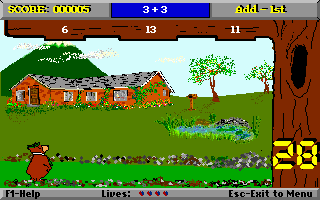
The core design creates an odd tension between calculated thinking and physical timing. You are not simply solving an equation in your head; you are racing against a ticking clock while steering a sluggish sprite into position. If you misjudge Yogi's alignment by a few pixels, your thrown rock misses the target completely, wasting precious seconds while the countdown ticks away.
Grade levels, timer settings, and a suspicious shareware lock
On paper, the game offers a surprisingly flexible set of options before you start a session. The configuration menu lets you customize the math drills across several difficulty parameters to suit different learning levels:
- Grade level selection spanning 1st grade through 6th grade math curriculum.
- Choice of basic operations, including addition, subtraction, multiplication, and division.
- Adjustable countdown timer speed to increase or decrease pressure on the player.
- Option for horizontal top display or vertical right display of the math equations.
In practice, the shareware distribution of the game came with a notorious catch that frustrated players. While the menu lists addition, subtraction, multiplication, and division, selecting operations other than addition frequently fails to work in the shareware version. Players who picked multiplication or division were often routed straight back to basic addition problems, leading many to suspect that higher math functions were strictly reserved for the registered paid edition.
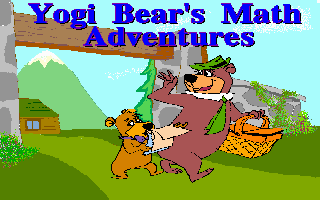
There was also the weird legal reality of its release. Official character licenses were rarely seen in low-budget shareware, raising questions about whether Jellystone's most famous resident was even officially licensed for this product. Tellingly, when publisher Genus Microprogramming, Inc. distributed the program in Europe, they stripped out the cartoon branding entirely and re-titled the software Sparky's Math Adventures to avoid trademark issues overseas.
Digitized speech on a PC speaker and early 1990 PC hardware
Programmed by Amaury Valdes, the game makes modest use of standard MS-DOS system hardware from the early nineties. It supports standard EGA and VGA display adapters, delivering clean background graphics with distinct green garden spaces and blue mountain peaks. The actual character animations are minimal, as Yogi simply slides sideways across a flat baseline without complex frame sequences.
Audio is handled almost entirely through the standard internal PC speaker, which provides basic squeaks and bleeps during gameplay. There is no background music to speak of while solving equations, leaving your session in total silence except for the sharp blips of your stone launches and timer warnings. However, the software does include one genuinely surprising technical trick: a digitized voice sample played through the PC speaker in the intro screen that actually speaks the full title out loud upon loading.
Compared to other educational software on the platform around 1990, such as Math Blaster or the Super Solvers series, this title strips away narrative fluff. There are no enemy characters wandering around, no end-of-level bosses, no hidden bonus rooms, and no named stages. You simply solve board after board of numbers until you close the application.
How the math gameplay holds up today
Viewing Yogi Bear's Math Adventures MS-DOS game through a modern lens reveals a very rigid product. DOSGames.com handed the title a dismal 0.5 out of 5 rating, pointing out that its simplistic mechanics and lack of variety mean it is unlikely to hold anyone's attention for more than a couple of minutes. Once you have thrown ten stones at ten math answers, you have seen every trick the software has to offer.
The single biggest flaw lies in the lack of feedback and reward systems. When a child solves a string of problems correctly, nothing happens beyond the next problem appearing. Without animated rewards, progress tracking, or playful interactions with the license, the game feels less like an exciting arcade challenge and more like a timed worksheet dressed up with a single bear sprite.
If you enjoy obscure pieces of early PC software history or want to see how shareware titles squeezed digitized voice out of a PC speaker, it has brief novelty value. As an actual educational tool or action puzzle game, however, it is an extremely basic drill exercise that wears out its welcome almost immediately.
Play Yogi Bear's Math Adventures online
You can play Yogi Bear's Math Adventures free in your browser right now without downloading old disk images or mounting virtual drives. Everything runs directly in your browser window, letting you test your basic arithmetic and stone-throwing accuracy with a single click.
If you want to experience this piece of 1990 shareware history firsthand, boot it up and see how many addition problems you can clear before the PC speaker timer runs out. Try adjusting the countdown speed in the options menu first to give yourself enough time to position Yogi under the floating numbers.
How Yogi Bear's Math Adventures is played — the keys the game listens to, grouped by what they do.
- Movement
- Action
Highlighted keys are mapped — hover or tap one to see what it does.
Players' controls
Touch and gamepad controls
The on-screen keyboard and gamepad mapping the browser player uses on a phone, a tablet or a controller, as opposed to the real keys above. $PRO members make their own in the player and share them here; anyone can pick one to play with.
Make your own touch controlsPRO
- 1Open the editorSign in below, then pick what to make. The game starts with the editor open over it.
- 2Place your keysAdd keys and drag them where your thumbs rest, or map a controller's buttons. Test plays the game with them; Save keeps them, and you play with them from then on.
- 3Share themShare them right after saving in the game, or name and share them here. Players vote, and the best become this game's controls for everyone.
Go PROSee how it worksSign in+20 XP for sharing · +50 XP if yours become the game's own
- The game's own controlsKeyboardGamepadWhat every player starts with.In use
2 screenshots
From the archive
No gameplay video yet
No gameplay video for Yogi Bear's Math Adventures yet. Sign in to add one.
No reviews yet
Tell the community what you think of Yogi Bear's Math Adventures. Reviews are public and tied to your username.
No archived manuals for Yogi Bear's Math Adventures yet
No manuals archived for this title yet. Sign in to upload the first scan.
Cheat codes, console commands and memory pokes for Yogi Bear's Math Adventures — each one verified and attributed.
Sign in to submitNo cheats yet for this title
Know a working cheat, poke or trainer? Add it with the button above. Moderators check every entry before it goes live.
No archived soundtrack for Yogi Bear's Math Adventures yet
No soundtrack archived for this title yet. Sign in to upload the first rip.
No save states for Yogi Bear's Math Adventures yet
No save states for this title yet. Sign in to share one.
Discussions
Sign in to post- Threads0
- Total posts0
- Online now6
Community · Yogi Bear's Math Adventures
Who's contributing, and what's new
- Reviews0
- Threads0
- Uploadsapproved0
- Contributors0
Recent activity
Nothing here yet
Reviews, discussion threads and approved uploads appear here as members add them.