
Out Run
aka OutRun · Outrun · アウトラン
Rate this game
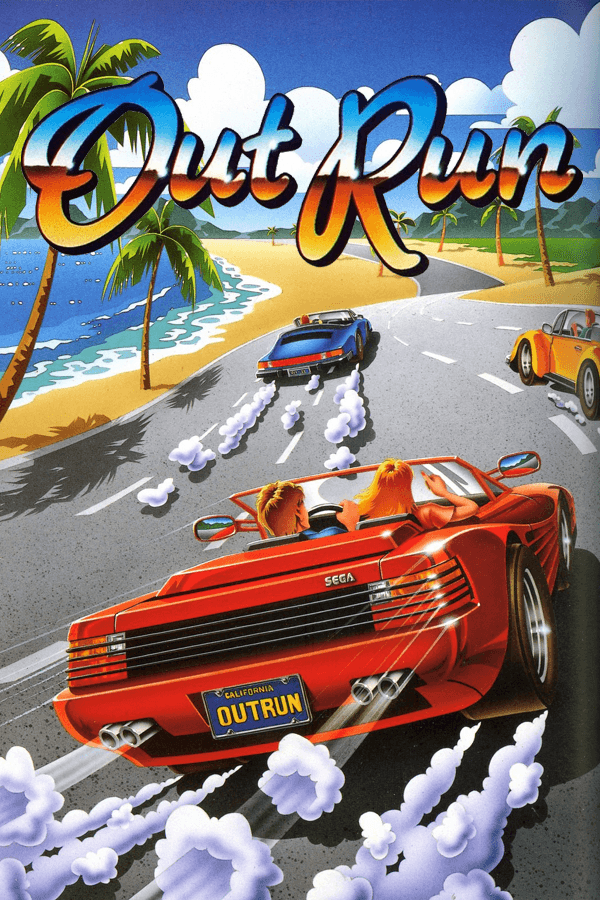
Stepping into Out Run on MS-DOS means taking control of a roaring red Ferrari Testarossa, clutching a keyboard, and trying to keep your passenger happy while outrunning a brutally tight clock.
Arcade thrills meet the crunch of the MS-DOS keyboard
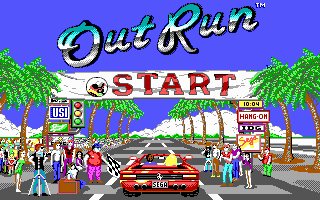
The moment you slam down on the accelerator in Out Run, the sensation of open-road freedom hits a hard wall of early PC hardware limitations. Recreating Yu Suzuki's coin-op marvel on desktop computers in 1989 was a tall order, but developers at Unlimited Software, Inc. managed to squeeze the essence of the highway experience into sixteen colors. Viewpoint sitting firmly behind the red convertible, you weave through five continuous legs of a journey selected from fifteen branching routes, watching the scenery shift from sunny coastlines to shaded forest roads.
Where console ports tried to replicate arcade hardware, this 1989 PC port takes its own path. Its crisp 16-color VGA graphics keep the road lanes readable at high speeds, even if the frame rate chugs when traffic gets thick. Driving requires split-second reactions to read oncoming trucks and sudden roadside obstacles, making every sharp turn a high-stakes decision.
How the controls and the ticking clock fight your progress
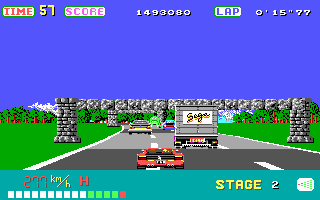
Playing the Out Run MS-DOS game reveals a control scheme that tested the patience of computer owners everywhere. Instead of natural left and right steering bounds, players were saddled with an awkward push-up to accelerate and pull-down to shift input method on standard keyboards. Tap the wrong key during a gentle turn, and your Testarossa immediately veers off the asphalt into a row of roadside signs.
Failing to clear a turn carries immediate consequences that destroy an otherwise perfect run. Hitting an ambient vehicle or a palm tree sends the sports car flipping through the air, throwing driver and passenger onto the grass while precious seconds tick away. To make matters worse, an infamously mean oversight in the port's code keeps the timer running even after you pass the end-of-stage checkmark, meaning your game can end while waiting for your bonus score to finish counting down.
- Left forks at the end of a stage lead to gentler curves and lighter traffic.
- Right forks branch into tighter mountain passes and heavy truck lanes.
- Flipping the car costs roughly five to eight seconds of real-time recovery.
Code lawsuits, keydisks, and PC speaker bleeps
Behind the scenes, the development story of this conversion is as wild as a high-speed crash. Programmers Pete Gardner and Amory Wong created the game under the banner of Unlimited Software, Inc., a pseudonym for Distinctive Software. Because they recycled backend engine code from their work on Test Drive II, publisher Accolade launched a high-profile copyright lawsuit over ownership of the source files, though Distinctive ultimately won in court.
When published by Mindscape, the physical release arrived on dual-media floppy disks protected by a keydisk scheme that forced players to keep Disk 1 in the drive. Audio was another compromise altogether. Unless you owned a Tandy system capable of multi-channel synthesis, the breezy soundtrack was reduced to monophonic chirps on the internal PC speaker.
Why this driving conversion still deserves a spin
Despite its mechanical quirks, this port captures the core appeal of the classic racing and driving formula. It strips away complex tuning, fuel management, and lap counts, focusing entirely on momentum, trajectory, and route choice. I find that once you get past the erratic keyboard mapping, the satisfaction of clearing a difficult S-bend at top speed remains genuinely satisfying.
If you want to see how home computers handled arcade ports back in the late eighties, this release shows clever technical compromises. It is an unforgiving test of reflexes where one bad crash ruins a five-stage run, but that cutthroat pacing is precisely what keeps you hitting the restart key.
You can play Out Run online right now, running Out Run free in your browser without needing to track down old floppy disks or configure keydisk checks. The digital version recreates the exact speed and keyboard challenges of the 1989 release, giving you an immediate shot at mastering the branches and keeping the Ferrari on the road.
How Out Run is played — the keys the game listens to, grouped by what they do.
- Movement
- Action
- Interface
Highlighted keys are mapped — hover or tap one to see what it does.
Press Ctrl+K at the start to select keyboard controls before playing.
Players' controls
Touch and gamepad controls
The on-screen keyboard and gamepad mapping the browser player uses on a phone, a tablet or a controller, as opposed to the real keys above. $PRO members make their own in the player and share them here; anyone can pick one to play with.
Make your own touch controlsPRO
- 1Open the editorSign in below, then pick what to make. The game starts with the editor open over it.
- 2Place your keysAdd keys and drag them where your thumbs rest, or map a controller's buttons. Test plays the game with them; Save keeps them, and you play with them from then on.
- 3Share themShare them right after saving in the game, or name and share them here. Players vote, and the best become this game's controls for everyone.
Go PROSee how it worksSign in+20 XP for sharing · +50 XP if yours become the game's own
- The game's own controlsKeyboardGamepadWhat every player starts with.In use
2 screenshots
From the archive
No reviews yet
Tell the community what you think of Out Run. Reviews are public and tied to your username.
No archived manuals for Out Run yet
No manuals archived for this title yet. Sign in to upload the first scan.
Cheat codes, console commands and memory pokes for Out Run — each one verified and attributed.
Sign in to submitNo cheats yet for this title
Know a working cheat, poke or trainer? Add it with the button above. Moderators check every entry before it goes live.
No archived soundtrack for Out Run yet
No soundtrack archived for this title yet. Sign in to upload the first rip.
No save states for Out Run yet
No save states for this title yet. Sign in to share one.
Discussions
Sign in to post- Threads0
- Total posts0
- Online now6
Community · Out Run
Who's contributing, and what's new
- Reviews0
- Threads0
- Uploadsapproved0
- Contributors0
Recent activity
Nothing here yet
Reviews, discussion threads and approved uploads appear here as members add them.