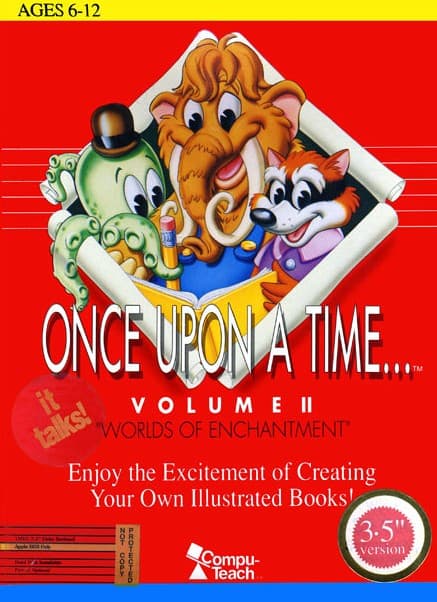
Once Upon a Time... Volume II: Worlds of Enchantment
Rate this game
- Played
- Rarely
Playing Once Upon a Time... Volume II: Worlds of Enchantment feels less like surviving a traditional adventure and more like holding the keys to an early 1990s digital storybook maker.
Building stories in Once Upon a Time... Volume II: Worlds of Enchantment
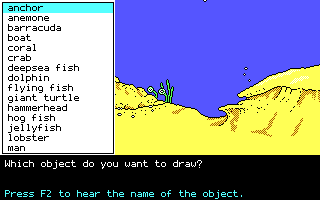
Most software arriving on home PCs at the dawn of the nineties demanded quick reflexes or complex key combinations to dodge death. Compu-Teach took a completely different path with this design, handing the cursor directly to young writers and asking them to assemble scenes piece by piece. You move through branching passages, selecting scenery, placing characters, and typing out text to construct complete illustrated books on screen.
The core engine gives you direct control over spatial relationships and basic perspective inside each layout. Dropping a graphic into the background automatically resizes and places it relative to foreground objects, forcing you to think about depth while you write. The software was adopted by over 20,000 schools across the United States, finding a heavy foot-hold in classrooms designed for ESL students who needed visual context paired directly with new vocabulary.
How the design shifts from traditional PC adventures
If you launch this expecting action, you will run into a wall within thirty seconds. There are no health bars, no hidden keys, and no inventory management puzzles to solve. Instead, the challenge comes from organizing ideas, matching background settings with appropriate sprites, and guiding a narrative through branching paths without losing track of your setup.
That lack of traditional mechanical pressure is exactly why it worked in home and school environments. As part of a four-volume series produced by Compu-Teach, it focused entirely on creation over execution. Rather than dying to a trap, your main obstacle is working within the strict memory and graphic limits of the era's hardware while trying to bring a specific scene to life.
Typing your way past system limits
The text input controls are straightforward, but working with early DOS text fields required absolute discipline. You write your prose directly into the panel accompanying your visual scene, managing line lengths so your printed or on-screen pages look right. For kids who grew up playing this in a school lab, half the fun was pushing the vocabulary choices to see how complex a story the software could hold together.
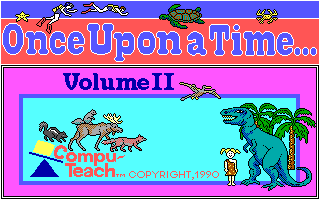
The trade-off for this flexibility is a total lack of modern conveniences. If you do not plan your scene ahead of time, rearranging pre-built graphical elements alongside text blocks quickly turns into a tedious cycle of trial and error. Still, seeing your custom layout assemble on an old monitor feels like a solid payoff for anyone who spent hours building stories back then.
Why you should play Once Upon a Time... Volume II: Worlds of Enchantment today
This software offers a rare look at an era when standard educational titles were trying to turn passive readers into active creators. It strips away the brutal difficulty spikes of contemporary software to highlight visual composition and simple text entry, showing how interactive tools began entering classrooms at the start of the decade.
You can try this classic 1990 release right now without messing with vintage system setups. You can experience this classic MS-DOS creation tool free in your browser right here. Fire up Once Upon a Time... Volume II: Worlds of Enchantment in your browser, pick a background template, drop in your first set of sprites, and see how fast you can layout your own interactive digital tale in ten minutes flat.
Players' controls
Touch and gamepad controls
The on-screen keyboard and gamepad mapping the browser player uses on a phone, a tablet or a controller, as opposed to the real keys above. $PRO members make their own in the player and share them here; anyone can pick one to play with.
Make your own touch controlsPRO
- 1Open the editorSign in below, then pick what to make. The game starts with the editor open over it.
- 2Place your keysAdd keys and drag them where your thumbs rest, or map a controller's buttons. Test plays the game with them; Save keeps them, and you play with them from then on.
- 3Share themShare them right after saving in the game, or name and share them here. Players vote, and the best become this game's controls for everyone.
Go PROSee how it worksSign in+20 XP for sharing · +50 XP if yours become the game's own
- The game's own controlsNone yet: played with a real keyboard only.In use
2 screenshots
From the archive
No gameplay video yet
No gameplay video for Once Upon a Time... Volume II: Worlds of Enchantment yet. Sign in to add one.
No reviews yet
Tell the community what you think of Once Upon a Time... Volume II: Worlds of Enchantment. Reviews are public and tied to your username.
No archived manuals for Once Upon a Time... Volume II: Worlds of Enchantment yet
No manuals archived for this title yet. Sign in to upload the first scan.
Cheat codes, console commands and memory pokes for Once Upon a Time... Volume II: Worlds of Enchantment — each one verified and attributed.
Sign in to submitNo cheats yet for this title
Know a working cheat, poke or trainer? Add it with the button above. Moderators check every entry before it goes live.
No archived soundtrack for Once Upon a Time... Volume II: Worlds of Enchantment yet
No soundtrack archived for this title yet. Sign in to upload the first rip.
No save states for Once Upon a Time... Volume II: Worlds of Enchantment yet
No save states for this title yet. Sign in to share one.
Discussions
Sign in to post- Threads0
- Total posts0
- Online now6
Community · Once Upon a Time... Volume II: Worlds of Enchantment
Who's contributing, and what's new
- Reviews0
- Threads0
- Uploadsapproved0
- Contributors0
Recent activity