If you ever wanted to jump straight into the top 100 DOOM level packs without fighting batch files or missing node-builders, DOOM: eXoWAD puts a decade of community history behind a single interface.
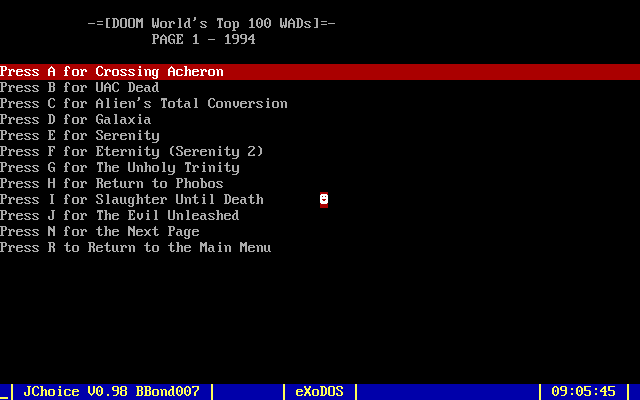
The standard way to play custom levels in the nineties was a mess of command-line switches, manual directory management, and hoping your Sound Blaster IRQ matched whatever custom executable a map maker bundled with their wad. Created by developer eXo as a dedicated module within the broader eXoDOS project, this collection automates the setup for ten years of mapmaking history spanning from 1994 to 2003. Instead of forcing you to hunt down forgotten WAD files and figure out which version of the engine they require, it uses a custom launcher menu script called jchoice to wire everything together.
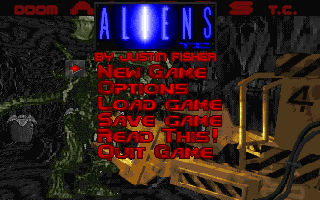
That means when you choose a total conversion like Aliens TC or Batman TC, the menu handles the engine switching and mod loading silently in the background. It even hooks into sound card configuration prompts before the executable spins up, letting you pick between standard DOS sound setups or native sound card defaults without editing a single configuration file by hand.
The collection acts as a live museum of early first-person shooter design. At its core is DOOMWorld's definitive list of the top 100 WADs published during the game's first decade, alongside select bonus maps released with commercial software and a curated subset of notorious community stinkers. The selection moves from simple geometry experiments made in early map editors to massive multi-level conversions that completely rewrote sprites, sounds, and weapon behaviors.
Because these maps span different eras of engine development, the launcher has to adapt on the fly. Some levels rely on original stock behavior, while others require source port extensions to handle massive monster counts or modern line-of-sight triggers. When you load a classic sci-fi base or a dark fantasy level built for Heretic, the underlying launcher matches the file against the correct executable automatically.
While the offline side of the setup works cleanly, network play introduces real friction. The system relies on DOOMatic and built-in IPX emulation to handle multiplayer across various maps. The main hurdle is that eXo noted remote IPX networking has not been tested on every single included level pack or total conversion. Certain custom maps flatly fail to spawn players correctly or lose their network functions entirely when forced through modern source ports.
The difficulty curve is another thing you have to accept going in. Because the launcher preserves these map packs exactly as their creators built them, you run into every cruel design habit of nineties level authors. You will hit sudden monster closets crammed with Arch-Viles, blind drops straight into lava pits, and puzzle levers hidden behind unmarked wall textures with zero mercy checkpoints.
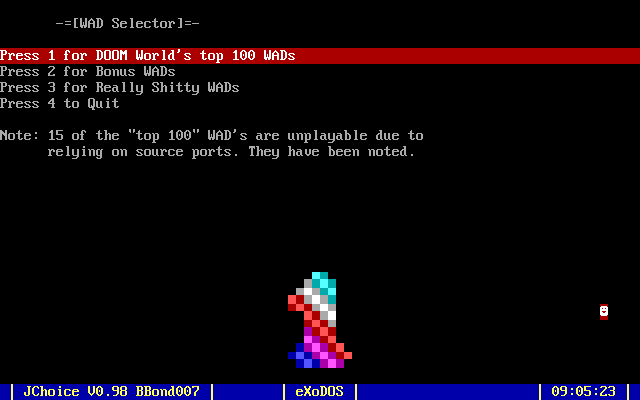
The custom jchoice script drives the entire experience, supporting keyboard, mouse, and gamepad inputs natively. It presents a clean menu structure that lets you browse by category, view map details, and select hardware profiles. The menu logic handles all file merging on the fly, eliminating the syntax errors that used to ruin custom gaming sessions on original hardware.
You can break the included content down into four distinct categories:

If you want to track how level design evolved from simple blocky rooms to complex layout tricks without spending an afternoon wrestling with old DOS scripts, this release holds up as the definitive shortcut. It preserves the exact feel of nineties shareware culture while stripping away the command-line headache. Anyone curious about the origins of modding or looking for a massive library of high-speed shooter action will find hundreds of hours of raw gameplay packed into this menu.
You can play DOOM: eXoWAD online as a free MS-DOS game right here in your web browser, with zero installation or manual configuration required. Just launch the page, pick a WAD from the menu with your keyboard or controller, and dive straight into decades of community-made map history. Jump into Aliens TC first just to hear how terrifying a Pulse Rifle sounded coming out of a virtual Sound Blaster back in 1994.
If you ever wanted to jump straight into the top 100 DOOM level packs without fighting batch files or missing node-builders, DOOM: eXoWAD puts a decade of community history behind a single interface.
The standard way to play custom levels in the nineties was a mess of command-line switches, manual directory management, and hoping your Sound Blaster IRQ matched whatever custom executable a map maker bundled with their wad. Created by developer eXo as a dedicated module within the broader eXoDOS project, this collection automates the setup for ten years of mapmaking history spanning from 1994 to 2003. Instead of forcing you to hunt down forgotten WAD files and figure out which version of the engine they require, it uses a custom launcher menu script called jchoice to wire everything together.
That means when you choose a total conversion like Aliens TC or Batman TC, the menu handles the engine switching and mod loading silently in the background. It even hooks into sound card configuration prompts before the executable spins up, letting you pick between standard DOS sound setups or native sound card defaults without editing a single configuration file by hand.

The collection acts as a live museum of early first-person shooter design. At its core is DOOMWorld's definitive list of the top 100 WADs published during the game's first decade, alongside select bonus maps released with commercial software and a curated subset of notorious community stinkers. The selection moves from simple geometry experiments made in early map editors to massive multi-level conversions that completely rewrote sprites, sounds, and weapon behaviors.
Because these maps span different eras of engine development, the launcher has to adapt on the fly. Some levels rely on original stock behavior, while others require source port extensions to handle massive monster counts or modern line-of-sight triggers. When you load a classic sci-fi base or a dark fantasy level built for Heretic, the underlying launcher matches the file against the correct executable automatically.
While the offline side of the setup works cleanly, network play introduces real friction. The system relies on DOOMatic and built-in IPX emulation to handle multiplayer across various maps. The main hurdle is that eXo noted remote IPX networking has not been tested on every single included level pack or total conversion. Certain custom maps flatly fail to spawn players correctly or lose their network functions entirely when forced through modern source ports.
The difficulty curve is another thing you have to accept going in. Because the launcher preserves these map packs exactly as their creators built them, you run into every cruel design habit of nineties level authors. You will hit sudden monster closets crammed with Arch-Viles, blind drops straight into lava pits, and puzzle levers hidden behind unmarked wall textures with zero mercy checkpoints.

The custom jchoice script drives the entire experience, supporting keyboard, mouse, and gamepad inputs natively. It presents a clean menu structure that lets you browse by category, view map details, and select hardware profiles. The menu logic handles all file merging on the fly, eliminating the syntax errors that used to ruin custom gaming sessions on original hardware.
You can break the included content down into four distinct categories:

If you want to track how level design evolved from simple blocky rooms to complex layout tricks without spending an afternoon wrestling with old DOS scripts, this release holds up as the definitive shortcut. It preserves the exact feel of nineties shareware culture while stripping away the command-line headache. Anyone curious about the origins of modding or looking for a massive library of high-speed shooter action will find hundreds of hours of raw gameplay packed into this menu.
You can play DOOM: eXoWAD online as a free MS-DOS game right here in your web browser, with zero installation or manual configuration required. Just launch the page, pick a WAD from the menu with your keyboard or controller, and dive straight into decades of community-made map history. Jump into Aliens TC first just to hear how terrifying a Pulse Rifle sounded coming out of a virtual Sound Blaster back in 1994.
How DOOM: eXoWAD is played — the keys the game listens to, grouped by what they do.
Highlighted keys are mapped — hover or tap one to see what it does.
Set up for modern play: W A S D move, the mouse turns (this engine has no mouse look, so moving the mouse forward walks), left click fires. The arrow keys still turn. Ctrl and Alt are left free because the browser uses them (Ctrl + W closes the tab).
The on-screen keyboard and gamepad mapping the browser player uses on a phone, a tablet or a controller, as opposed to the real keys above. $PRO members make their own in the player and share them here; anyone can pick one to play with.
Cheat codes, console commands and memory pokes for DOOM: eXoWAD — each one verified and attributed.
Sign in to submitHow DOOM: eXoWAD is played — the keys the game listens to, grouped by what they do.
Highlighted keys are mapped — hover or tap one to see what it does.
Set up for modern play: W A S D move, the mouse turns (this engine has no mouse look, so moving the mouse forward walks), left click fires. The arrow keys still turn. Ctrl and Alt are left free because the browser uses them (Ctrl + W closes the tab).
The on-screen keyboard and gamepad mapping the browser player uses on a phone, a tablet or a controller, as opposed to the real keys above. $PRO members make their own in the player and share them here; anyone can pick one to play with.
Cheat codes, console commands and memory pokes for DOOM: eXoWAD — each one verified and attributed.
Sign in to submit
The Ultimate DOOM1995
DOOM: eXoWAD2021 · this page
The Ultimate DOOM1995
DOOM: eXoWAD2021 · this page